





Get ready to experience a smarter way to browse the web! Google is rolling out a significant update to its AI Mode in Chrome, available now for both desktop and mobile users. This enhanced experience aims to help you dive deeper into topics and conduct research directly alongside your web content, all without the hassle of constantly switching tabs or losing your place.
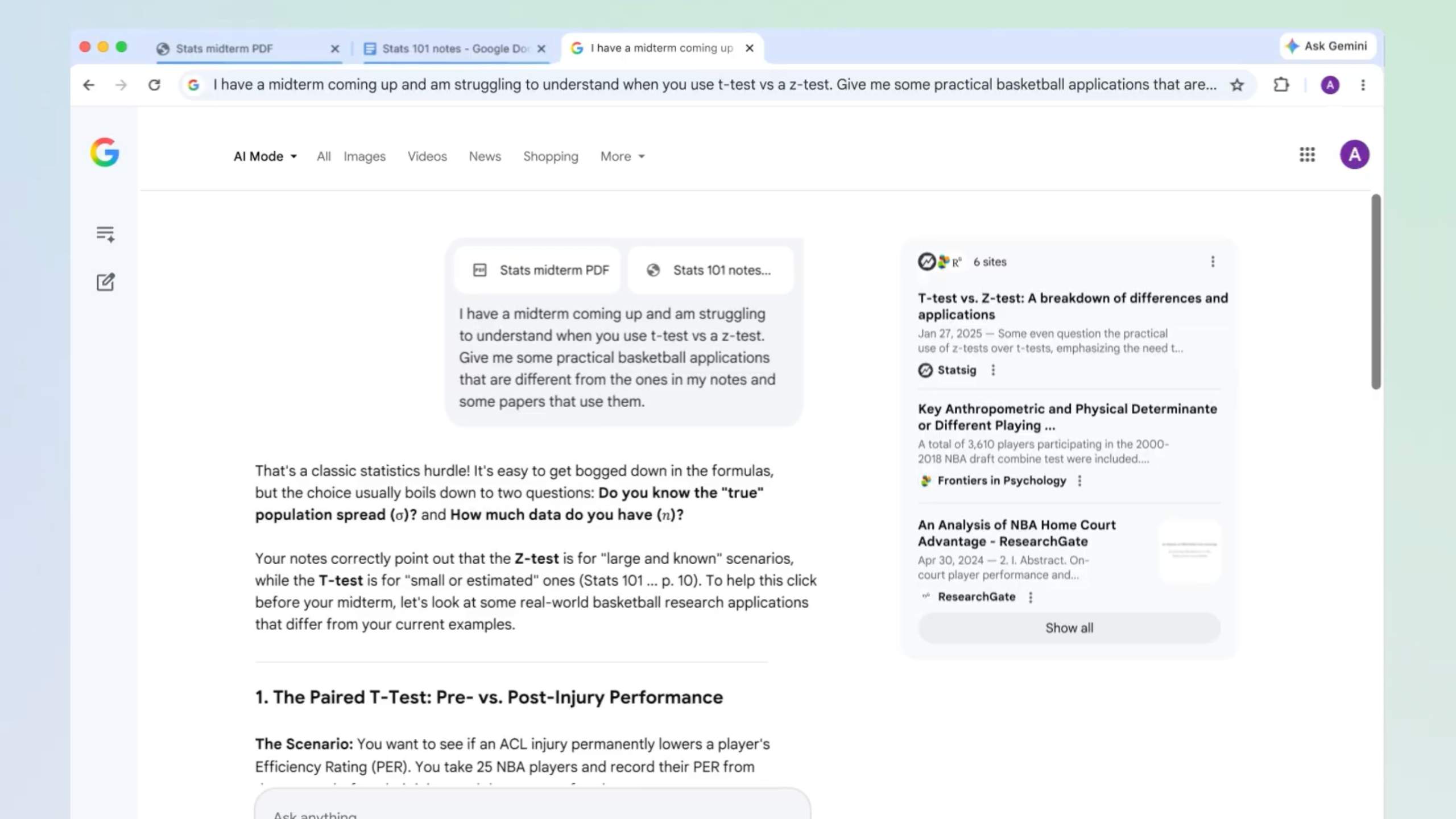
What’s New with Chrome’s AI Mode?
The core of this update is a redesigned interaction that makes Chrome an active research assistant. Previously, clicking a link from an AI Mode response might open a new tab, forcing users to juggle between windows. However, Google has introduced a new side-by-side search feature that changes everything.
Now, when you click a link from an AI Mode response on desktop, the webpage opens directly alongside your AI Mode conversation in a convenient side panel. This persistent layout allows you to explore source material, verify details, and ask contextual follow-up questions seamlessly, maintaining the flow of your original query.
A Deeper Dive into Topics
Beyond the split-screen view, the updated AI Mode offers more powerful ways to gather information. You can now easily search across your open tabs. A new “plus” menu, found in the search bar or within AI Mode itself, lets you select recent browser tabs—like lecture notes, PDFs, or research papers—and add them as context to a new query.
Furthermore, this multi-input capability allows AI Mode to synthesize information from these various sources, providing a consolidated, custom answer. You can even mix and match multiple tabs, images, or other files like PDFs, bringing all that context into AI Mode for a comprehensive understanding.
AI Mode on Desktop and Mobile
This enhanced AI Mode experience is rolling out across Google Chrome for desktop, Android, and iOS devices. This means a consistent and powerful AI-powered browsing experience, whether you’re at your computer or on the go.
Google has confirmed that these features are initially available for English-language users in the United States. The company has plans to expand the feature to more countries and languages in the future, signaling this as a key direction for Chrome’s development.
Why This Matters
The new AI Mode in Chrome represents a significant leap forward in how we interact with information online. By integrating AI directly into the browsing experience, Google aims to reduce the common frustration of tab-switching and streamline research tasks.
This update can drastically improve productivity for students, professionals, and anyone who frequently conducts research or compares information online. Being able to view content and engage with an AI assistant simultaneously means a more focused and efficient browsing journey. For more on how Google uses AI, visit the official Google AI page. For general information about Chrome, check out the Google Chrome website. To understand how AI features work in Google Search, you can explore Google Search’s official resources.
Conclusion
Google’s updated AI Mode is set to redefine the browsing experience, making Chrome more intuitive and powerful. By allowing users to dive deeper into topics with side-by-side search and multi-source analysis, it transforms the browser into a truly intelligent companion. This rollout marks an exciting step in making AI a seamless part of our daily digital lives.
