Close Menu
DroidfeatsDroidfeats

    Subscribe to Updates

    Join our most passionate readers to get instant access to tech tips as they arrive!

    What's Hot
    Android Sideloading Bypass Now Transfers to New Phones

    Android Sideloading Bypass Now Transfers to New Phones

    March 28, 2026
    Meta to Launch Ray-Ban Smart Glasses Designed for Prescriptions

    Meta to Launch Ray-Ban Smart Glasses Designed for Prescriptions

    March 28, 2026
    Google Pixel 10a Review: A Familiar Face in 2026

    Google Pixel 10a Review: A Familiar Face in 2026

    March 28, 2026
    Facebook X (Twitter) Instagram
    • About
    • Privacy Policy
    • DMCA
    • Team
    • Get In Touch
    Facebook X (Twitter) Instagram Pinterest RSS
    DroidfeatsDroidfeats
    • Home
    • News
    • Apps
    • Tips
    • VPN
    • #TheBest
      • Get GCam Ports
      • USB Drivers
      • Get Magisk
      • Get Play Store
      • Get ADB binaries
    • Commands
    Best Deals
    DroidfeatsDroidfeats
    News

    Android Sideloading Bypass Now Transfers to New Phones

    Saeed Ashif AhmedBy Saeed Ashif AhmedMarch 28, 2026No Comments3 Mins Read
    Share
    Facebook Twitter LinkedIn Pinterest Reddit Email

    Good news for Android users who frequently install apps from outside the Google Play Store! Google has introduced a new “advanced flow” for enabling Android sideloading, and the best part is that this setting will now carry over when you upgrade to a new phone. This change promises to significantly streamline the setup process for many users.
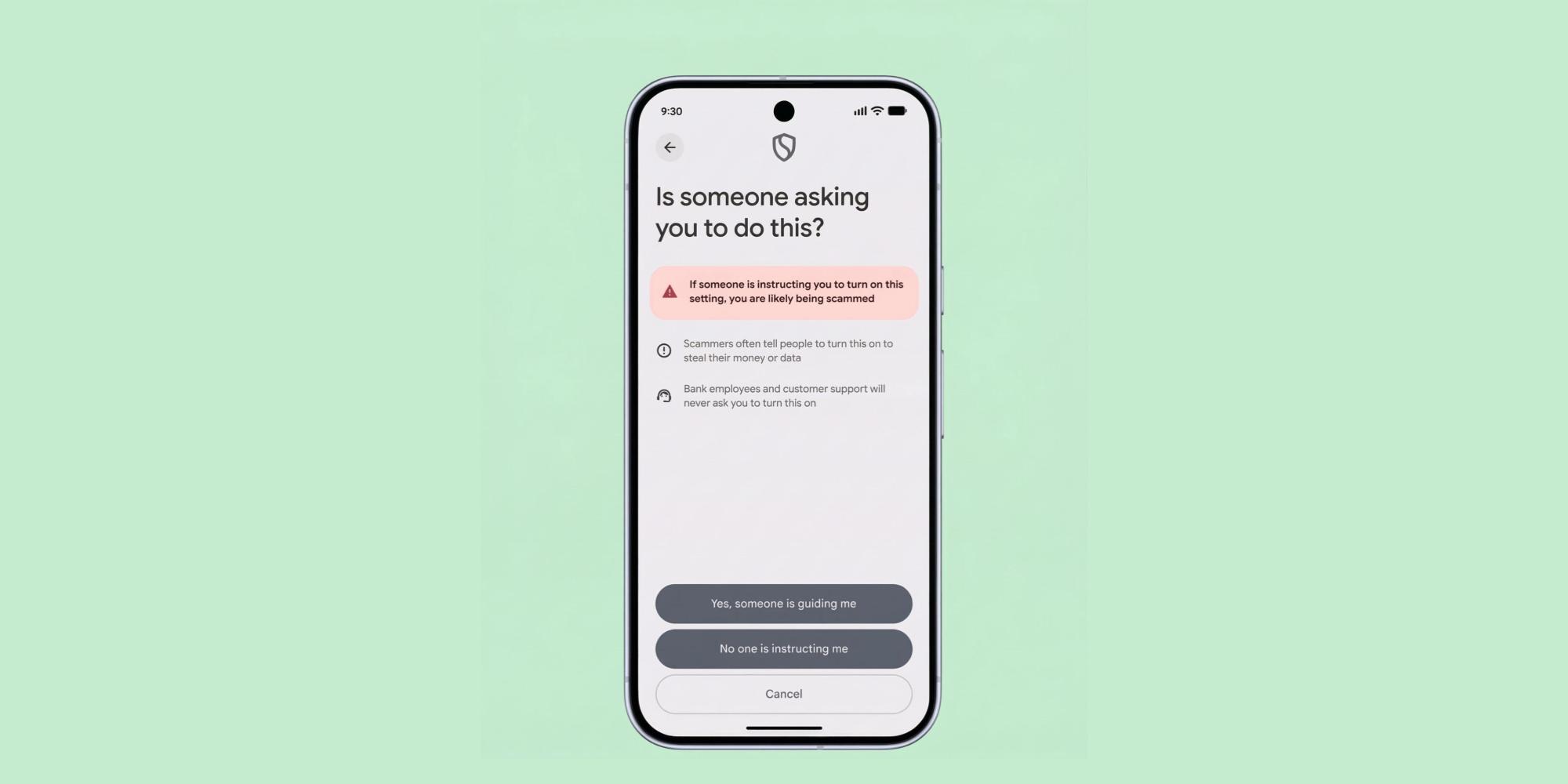
    | Image credit: 9to5Google

    What is Android Sideloading?

    Sideloading refers to the process of installing applications on your Android device from sources other than the official Google Play Store. This might include downloading an app directly from a developer’s website or using an alternative app store. While it offers flexibility, Google has traditionally implemented security measures, like warnings and manual permission grants, to ensure users understand the potential risks involved with installing apps from unverified sources.

    The “Advanced Flow” Explained

    Google’s newly announced “advanced flow” for sideloading is designed to make this process more user-friendly without compromising security. Previously, if you wanted to sideload apps, you had to navigate through security settings on each new device and grant specific permissions, often for individual apps or sources. This could be a repetitive and time-consuming task, especially for those who frequently upgrade their phones or manage multiple devices.

    No More Repeated Bypasses

    The most significant improvement with this new system is that once you enable the advanced flow for Android app distribution on your current phone, that preference will automatically transfer when you set up a new Android device. This means you won’t have to repeat the bypass steps every time you get a new smartphone. Instead, your choice to allow sideloading will be remembered, making the transition much smoother.

    Why This Matters to You

    This update is a considerable quality-of-life improvement for a specific segment of Android users. If you rely on apps not available on the Google Play Store, or prefer using alternative app marketplaces, this change will save you time and effort. It acknowledges that some users understand the risks associated with sideloading and should have a more permanent way to manage these preferences across their devices.

    Furthermore, it shows Google’s continued effort to balance user freedom with security. While the initial setup still requires a conscious decision from the user, the long-term maintenance of that decision is now much easier. The advanced flow is set to roll out later this year, bringing this much-anticipated convenience to Android users.

    Looking Ahead

    This move highlights a growing trend towards more personalized and persistent user settings within the Android ecosystem. As devices become more integrated and user habits evolve, features that simplify transitions between hardware will become increasingly valuable. Expect to see more thoughtful improvements like this that enhance the overall user experience.

    This update to the Android sideloading bypass mechanism is a welcome change for many, promising a less cumbersome experience when setting up new phones. It’s a small but impactful improvement that demonstrates Google’s attention to the diverse needs of its user base.

    Source

    • 9to5Google
    Android app installs Google sideloading Tech News
    Follow on Google News Follow on Facebook
    Share. Facebook Twitter Pinterest LinkedIn Tumblr Email
    Previous ArticleMeta to Launch Ray-Ban Smart Glasses Designed for Prescriptions
    Saeed Ashif Ahmed
    • Website
    • Facebook
    • X (Twitter)
    • LinkedIn

    Saeed Ashif Ahmed is passionate about emerging technologies and their potential to create a fairer world. A car enthusiast and civil engineer, he loves cricket and cherishes his alma mater, Navodaya Vidyalaya (JNV).

    Related Posts

    Meta to Launch Ray-Ban Smart Glasses Designed for Prescriptions
    News

    Meta to Launch Ray-Ban Smart Glasses Designed for Prescriptions

    March 28, 2026
    Google Pixel 10a Review: A Familiar Face in 2026
    News

    Google Pixel 10a Review: A Familiar Face in 2026

    March 28, 2026
    Free Up 7GB on Your Pixel: Disable AICore for More Space
    News

    Free Up 7GB on Your Pixel: Disable AICore for More Space

    March 28, 2026
    Add A Comment
    Leave A Reply Cancel Reply

    Top Posts
    MX Player Custom Codec [AC3, DTS, MLP, TrueHD, and more]

    MX Player Custom Codec [AC3, DTS, MLP, TrueHD, and more]

    January 4, 2025181K
    Do a Barrel Roll 20 Times on Google & other search games (2025)

    Do a Barrel Roll 20 Times on Google & other search games (2025)

    April 12, 202558,492
    47 best root apps for Android devices in 2025 (NEW LIST – Updated)

    47 best root apps for Android devices in 2025 (NEW LIST – Updated)

    April 16, 202529,698
    Stay In Touch
    • Facebook
    • Twitter
    • Instagram
    • Pinterest
    • Reddit
    • Telegram
    Latest Reviews
    Your dream Tablet just got cheaper: Galaxy Tab S9 Ultra sale
    9.5
    Deals

    Your dream Tablet just got cheaper: Galaxy Tab S9 Ultra sale

    Leisangthem RajshreeMarch 3, 2024
    Tixee Review – Honest opinion from a trader [Updated] Tips

    Tixee Review – Honest opinion from a trader [Updated]

    Saeed Ashif AhmedNovember 3, 2022

    Subscribe to Updates

    Join our most passionate readers to get instant access to tech tips as they arrive!

    Most Popular
    MX Player Custom Codec [AC3, DTS, MLP, TrueHD, and more]

    MX Player Custom Codec [AC3, DTS, MLP, TrueHD, and more]

    January 4, 2025181K
    Do a Barrel Roll 20 Times on Google & other search games (2025)

    Do a Barrel Roll 20 Times on Google & other search games (2025)

    April 12, 202558,492
    47 best root apps for Android devices in 2025 (NEW LIST – Updated)

    47 best root apps for Android devices in 2025 (NEW LIST – Updated)

    April 16, 202529,698
    Our Picks
    Android Sideloading Bypass Now Transfers to New Phones

    Android Sideloading Bypass Now Transfers to New Phones

    March 28, 2026
    Meta to Launch Ray-Ban Smart Glasses Designed for Prescriptions

    Meta to Launch Ray-Ban Smart Glasses Designed for Prescriptions

    March 28, 2026
    Google Pixel 10a Review: A Familiar Face in 2026

    Google Pixel 10a Review: A Familiar Face in 2026

    March 28, 2026

    Subscribe to Updates

    Join our most passionate readers to get instant access to tech tips as they arrive!

    Facebook X (Twitter) Instagram Pinterest
    • About Us
    • Privacy Policy
    • Terms
    • Jobs
    • Contact
    © 2026 Droidfeats. All rights reserved.

    Type above and press Enter to search. Press Esc to cancel.

    Ad Blocker Enabled!
    Ad Blocker Enabled!
    Our website is made possible by displaying online advertisements to our visitors. Please support us by disabling your Ad Blocker.