
Close Menu
DroidfeatsDroidfeats

    Subscribe to Updates

    Join our most passionate readers to get instant access to tech tips as they arrive!

    What's Hot
    What to Check When a Card Game Feels Different on Android

    What to Check When a Card Game Feels Different on Android

    September 16, 2026
    Anker Launches 10-in-1 Smart Display USB-C Hub for 0

    Anker Launches 10-in-1 Smart Display USB-C Hub for $100

    September 16, 2026
    Samsung Fixes Galaxy Z Fold 8 Home Screen App Icon Bug

    Samsung Fixes Galaxy Z Fold 8 Home Screen App Icon Bug

    September 16, 2026
    Facebook X (Twitter) Instagram
    • About
    • Privacy Policy
    • DMCA
    • Team
    • Get In Touch
    Facebook X (Twitter) Instagram Pinterest RSS
    DroidfeatsDroidfeats
    • Home
    • News
    • Apps
    • Tips
    • VPN
    • #TheBest
      • Get GCam Ports
      • USB Drivers
      • Get Magisk
      • Get Play Store
      • Get ADB binaries
    • LoL Tier List
    Best Deals
    DroidfeatsDroidfeats
    You are at:Home»News»Samsung Fixes Galaxy Z Fold 8 Home Screen App Icon Bug
    News

    Samsung Fixes Galaxy Z Fold 8 Home Screen App Icon Bug

    Ananya MukherjeeBy Ananya MukherjeeSeptember 16, 2026No Comments4 Mins Read
    Share
    Facebook Twitter LinkedIn Pinterest Reddit Email

    Samsung has addressed an interface glitch on the Galaxy Z Fold 8 that caused home screen app icons to drift into incorrect positions, overlap, or become entirely inaccessible on the inner display.

    Key points

    • Samsung issued an update to its Home Up Good Lock module to fix home screen icon misalignment.
    • The glitch caused icons on the Galaxy Z Fold 8 to overlap, shift out of bounds, or become immovable.
    • Updating to Home Up version 18.0.00.36 stops the glitch, but users must manually rearrange existing icons.
    • The patch initially rolled out in South Korea on September 4, 2026, ahead of wider availability.
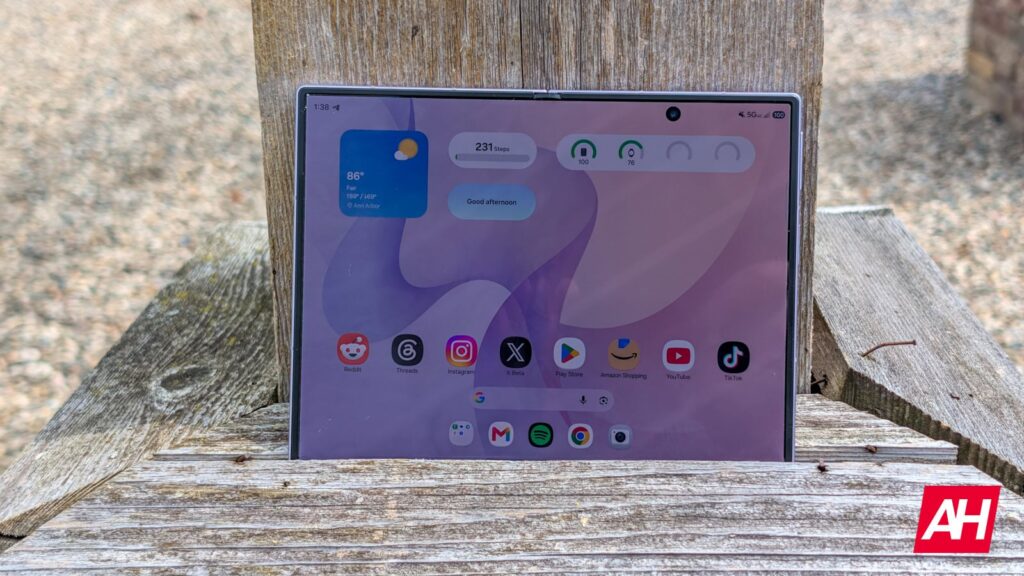
    Samsung Fixes Galaxy Z Fold 8 Home Screen App Icon Bug
    Samsung Galaxy Z Fold 8 unfolded showing the inner home screen display. Image: Android Headlines

    The problem stems from layout handling within the Good Lock suite, prompting a software patch for the affected personalization module. Device owners who experienced irregular icon positioning on their Samsung Galaxy Z Fold 8 can restore proper launcher behavior by downloading the latest service update through the Galaxy Store.

    Icons Overlapping and Trapped Between Panes

    User reports surfaced on the official Samsung Community forums detailing erratic icon placement across the device’s foldable interior screen. Affected users noted that application shortcuts frequently overlapped with one another or wandered outside the defined margins of the display grid.

    In several cases, shortcuts migrated into the inactive threshold between the two screen panes. Once lodged inside this central hinge space, the icons became unselectable and could not be dragged back onto the active grid. Attempting to lock the home screen layout or manually reposition the shortcuts provided only temporary relief, with screens reverting to a disorderly state within several days.

    The issue persisted even on units acquired through early retail programs and Galaxy Z Fold 8 pre-orders, affecting both stock launcher grids and heavily customized arrangements.

    Home Up Update 18.0.00.36 Delivers the Fix

    A member of Samsung’s Good Lock support team confirmed the behavior and pointed users toward an updated build of the Home Up module. The correction is packaged inside version 18.0.00.36, which initially began its deployment in South Korea on September 4, 2026, before reaching additional territories.

    As detailed in a Samsung Members community post regarding the build, the release specifically stabilizes launcher grid management to halt recurring icon drift. Device owners can check for and apply the update through a few standard steps:

    • Open the Good Lock application on the device.
    • Navigate to the “Apps” section within the interface.
    • Locate the Home Up module.
    • Tap the update icon next to Home Up to download version 18.0.00.36.

    Installing the updated module prevents future layout degradation, but it does not automatically repair an already scrambled grid. Users must enter Home Screen Edit mode to manually reposition displaced shortcuts onto their preferred grid coordinates.

    Dual-Screen Recalculations on Foldable Form Factors

    Foldable devices require continuous grid recalculation when transitioning between folded and unfolded orientations. The wider aspect ratio introduced on the Galaxy Z Fold 8 alters default coordinate systems compared to conventional single-panel devices.

    Samsung previously released Home Up version 18.0.00.32 to correct DIY home screen layout position errors on One UI 9. Despite that adjustment, layout calculations on large interior foldables continued to place icons off-center under certain conditions, as outlined in community troubleshooting steps.

    Version 18.0.00.36 resolves the underlying conflict by standardizing boundary rules when Home Up adjusts grid dimensions. Owners encountering persistent icon drift are advised to verify their module version number within the Good Lock menu to confirm the patch is active.

    Related coverage

    • Galaxy Z Fold 8 Rumored to Shrink Selfie Camera Cutout
    • Galaxy Z Fold 8 Leak Shows Wider Design Compared to ‘Ultra’ Model
    • Google Wallet Tests New Vertical Card Layout on Android
    • Samsung Galaxy Z Fold 8 Rumors Detail Lighter Design, Camera Upgrades

    Source

    Originally reported by Android Headlines.

    “Samsung Addresses Galaxy Z Fold 8’s App Misalignment Bug”

    Read the original report ↗
    Android Apps Galaxy Z Fold 8 Good Lock One UI Samsung
    Add as Preferred on Google Follow on Flipboard
    Share. Facebook Twitter Pinterest LinkedIn Tumblr Email Copy Link
    Previous ArticleIndia Investigates Apple Over iOS 18 Hardware Damage Claims
    Next Article Anker Launches 10-in-1 Smart Display USB-C Hub for $100
    Ananya Mukherjee

    Kolkata based Android fan, but not a geek. I love the cool stuff, not techie stuff.

    Related Posts

    Anker Launches 10-in-1 Smart Display USB-C Hub for 0
    News

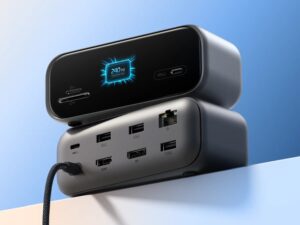
    Anker Launches 10-in-1 Smart Display USB-C Hub for $100

    September 16, 2026
    India Investigates Apple Over iOS 18 Hardware Damage Claims
    News

    India Investigates Apple Over iOS 18 Hardware Damage Claims

    September 16, 2026
    Google Launches Gemini 3.8 Live AI Voice Models
    News

    Google Launches Gemini 3.8 Live AI Voice Models

    September 16, 2026
    Add A Comment
    Leave A Reply Cancel Reply

    Top Posts
    MX Player Custom Codec [AC3, DTS, MLP, TrueHD, and more]

    MX Player Custom Codec [AC3, DTS, MLP, TrueHD, and more]

    May 1, 2026222K Views
    Do a Barrel Roll 20 Times on Google & other search games (2026)

    Do a Barrel Roll 20 Times on Google & other search games (2026)

    May 1, 202658,609 Views
    47 best root apps for Android devices in 2025 (NEW LIST – Updated)

    47 best root apps for Android devices in 2025 (NEW LIST – Updated)

    April 16, 202530,531 Views
    Stay In Touch
    • Facebook
    • Twitter
    • Instagram
    • Pinterest
    • Reddit
    • Telegram
    Latest News
    Anker Launches 10-in-1 Smart Display USB-C Hub for 0 News

    Anker Launches 10-in-1 Smart Display USB-C Hub for $100

    By Saeed Ashif AhmedSeptember 16, 2026
    India Investigates Apple Over iOS 18 Hardware Damage Claims News

    India Investigates Apple Over iOS 18 Hardware Damage Claims

    By Saeed Ashif AhmedSeptember 16, 2026
    Google Launches Gemini 3.8 Live AI Voice Models News

    Google Launches Gemini 3.8 Live AI Voice Models

    By Debapriya BhattaSeptember 16, 2026

    Subscribe to Updates

    Join our most passionate readers to get instant access to tech tips as they arrive!

    Most Popular
    MX Player Custom Codec [AC3, DTS, MLP, TrueHD, and more]

    MX Player Custom Codec [AC3, DTS, MLP, TrueHD, and more]

    May 1, 2026222K Views
    Do a Barrel Roll 20 Times on Google & other search games (2026)

    Do a Barrel Roll 20 Times on Google & other search games (2026)

    May 1, 202658,609 Views
    47 best root apps for Android devices in 2025 (NEW LIST – Updated)

    47 best root apps for Android devices in 2025 (NEW LIST – Updated)

    April 16, 202530,531 Views
    Our Picks
    Anker Launches 10-in-1 Smart Display USB-C Hub for 0

    Anker Launches 10-in-1 Smart Display USB-C Hub for $100

    September 16, 2026
    Samsung Fixes Galaxy Z Fold 8 Home Screen App Icon Bug

    Samsung Fixes Galaxy Z Fold 8 Home Screen App Icon Bug

    September 16, 2026
    India Investigates Apple Over iOS 18 Hardware Damage Claims

    India Investigates Apple Over iOS 18 Hardware Damage Claims

    September 16, 2026

    Subscribe to Updates

    Join our most passionate readers to get instant access to tech tips as they arrive!

    Facebook X (Twitter) Instagram Pinterest
    • About Us
    • Privacy Policy
    • Terms
    • Jobs
    • Contact
    © 2026 Droidfeats. All rights reserved.

    Type above and press Enter to search. Press Esc to cancel.

    Ad Blocker Enabled!
    Ad Blocker Enabled!
    Our website is made possible by displaying online advertisements to our visitors. Please support us by disabling your Ad Blocker.