
Quick answer
Go to Settings, then Security, then Where You're Logged In, and tap Log Out of All Other Sessions to clear every remote login except the device you're using right now.
If you left your Roblox account signed in on a school computer, a friend’s phone, or any device you no longer control, you do not need to track it down. Roblox keeps a record of every active login tied to your account, and it lets you end all of them remotely.
This walks through Roblox’s Session Management tool, found under the Security tab, on both the website or desktop app and the mobile app. You will see exactly which devices are active and clear them all with one tap.
Before you start
- Difficulty Easy
- Time needed 3 minutes
- Works on Roblox website, Desktop app, iOS app, Android app (current versions)
What you'll need
- A Roblox account logged in on the device you'll use to trigger the sign-out
- Internet access on that device
- Your Roblox password (only needed if you also plan to change it)
Important
- Log Out of All Other Sessions cannot sign out the device you're currently using to trigger it.
- If you suspect your account is compromised, change your password immediately, since this is the only action that also ends the current session.
Sign Out of All Devices on Web or Desktop App
Use this method from a browser at roblox.com or from the Roblox Desktop app.
Step 1: Log in to Roblox
Go to the Roblox website or open the Desktop app and sign in with your account.
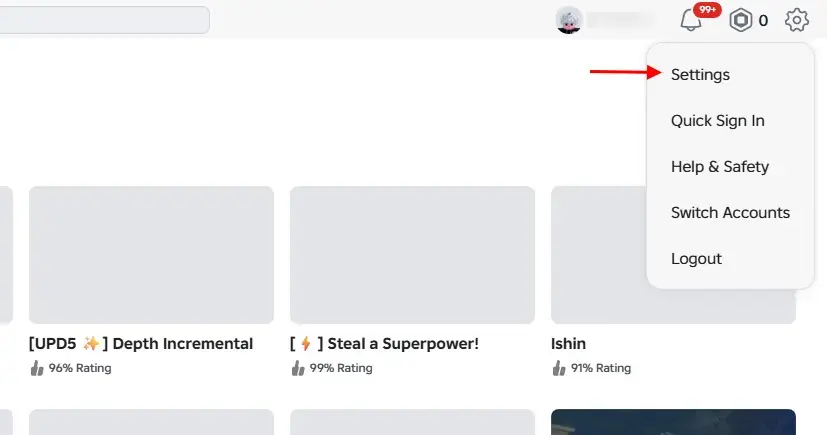
Step 2: Open Settings
Click the gear icon in the top-right corner and select Settings from the dropdown menu.
Step 3: Select the Security tab
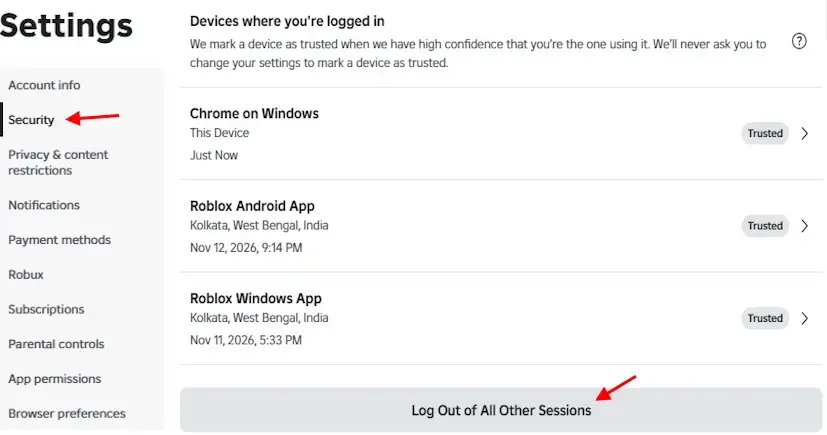
In the left-hand sidebar, click Security.
Step 4: Scroll to Where You're Logged In
Scroll down until you see the Where You’re Logged In section, which lists every active session with its device, approximate location, and last active time.
Tip: Check this list first if you only want to remove one suspicious device instead of all of them.
Step 5: Tap Log Out of All Other Sessions
Click Log Out of All Other Sessions at the bottom of the list.
Step 6: Confirm the log out
Click Log Out on the pop-up prompt. Every device except the one you’re currently using is signed out immediately.
Sign Out of All Devices on the Roblox Mobile App
The same Session Management tool works from the Roblox app on iPhone, iPad, or Android, since the app’s menu is identical across both platforms.
Step 1: Open the Roblox app
Launch the Roblox app on your iPhone, iPad, or Android device and make sure you’re logged in.
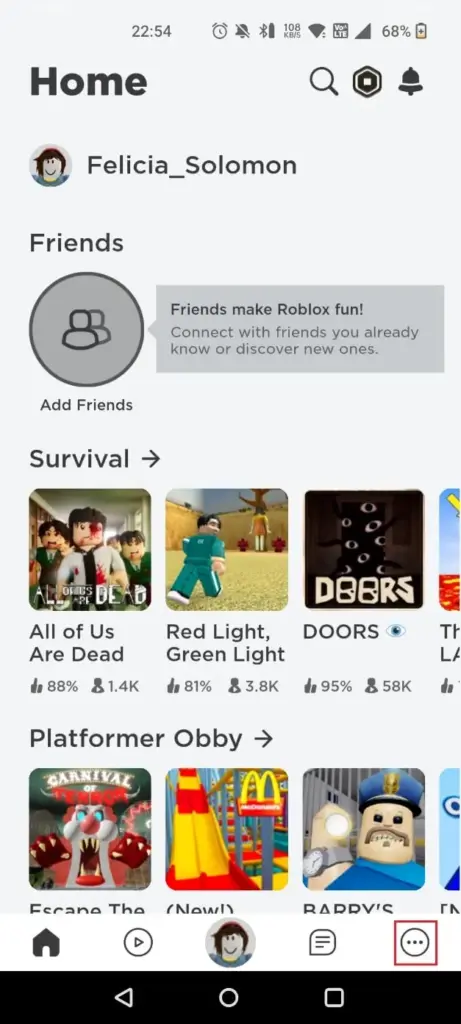
Step 2: Tap the More icon
Tap the three-dot More icon in the bottom-right navigation bar.
Step 3: Open Settings
Scroll down and tap Settings, shown with a gear icon.
Step 4: Select Security
Tap Security from the settings list.
Step 5: View Where You're Logged In
Swipe down to the Where You’re Logged In section to see every active device tied to your account.
Step 6: Tap Log Out of All Other Sessions
Tap Log Out of All Other Sessions at the bottom of the screen, then tap Log Out again to confirm. All other logins end at once, while the phone or tablet you’re holding stays signed in.
Pro tips
- Review the device, location, and last active details under Where You're Logged In once a month to catch unfamiliar sessions early.
- Pair a sign-out with enabling 2-Step Verification for stronger protection going forward.
- If you use a Meta Quest headset, its session appears under the same Security menu and can be logged out individually.
Troubleshooting
| Problem | What to do |
|---|---|
| A device won't disappear from the session list or won't log out remotely. | Change your Roblox password. This forces a global sign-out across every device, including ones that didn't respond to the normal log-out button. |
| An Xbox or PlayStation session doesn't show up the same way as phones and computers. | Console sessions aren't listed the same way in Session Management. Sign out locally on the console, or change your password to force it off remotely. |
Frequently asked questions
Does logging out of all devices delete my Roblox progress or Robux?
No. Signing out only ends active sessions. Your Robux, Premium membership, avatar items, friends list, and game progress all stay exactly as they were.
Will Log Out of All Other Sessions also sign me out of the device I'm using?
No. It ends every other active login but leaves the current device and app or browser signed in.
How do I force a sign-out on every device, including the one I'm using?
Change your Roblox account password. That is the only action that ends the current session along with every other one.
Can I log out of just one suspicious device instead of all of them?
Yes. Under Where You’re Logged In, you can select an individual session and log it out without affecting your other devices.
With Session Management, clearing old logins takes a few taps and does not touch your account data. If you ever suspect someone else has access, follow up by changing your password for full peace of mind.
Sources and further reading
- Beebom — How to Sign Out of All Devices on Roblox
- AgataSmurf — Roblox Session Management: Where You're Logged In
- BetterBLOX — How to Log Out of Roblox on All Devices | BetterBLOX
- TechCult — How to Log Out of Roblox on All Devices