Quick answer
Open the App Store, search for Fortnite, and tap Get — the game returned natively to Australia's App Store on October 22, 2026, so no workaround account is needed if your Apple Account region is already set to Australia.
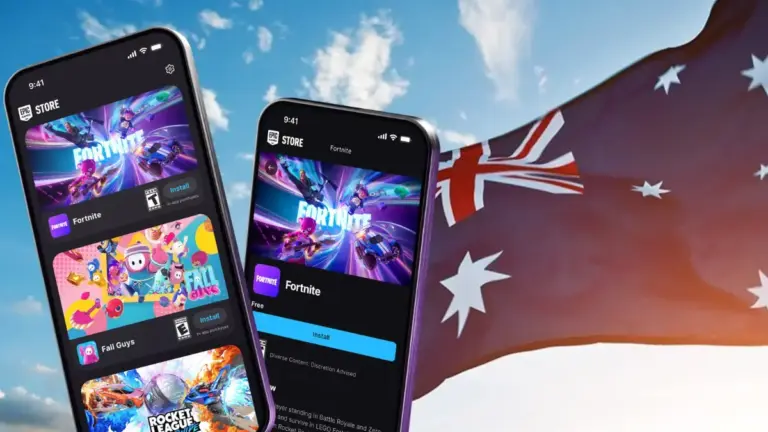
After nearly six years of being blocked from iPhones in Australia, Fortnite is back on the App Store following a Federal Court ruling against Apple. If your Apple Account is already set to Australia, you can now download it the normal way, without a US or EU account workaround.
Below is the direct install process, plus what to do if Fortnite still refuses to show up in search because of an old region setting.
Before you start
- Difficulty Easy
- Time needed 5 minutes
- Works on iPhone with iOS 17.0 or later, Australian Apple Account
What you'll need
- An Apple ID with Country/Region set to Australia
- iOS 17.0 or later on a supported iPhone
- A stable internet connection and free storage space
Important
- Changing your Apple Account country can affect access to apps, subscriptions, and purchases tied to your old region, so review what's active before switching.
- Spend any remaining Apple Account balance and cancel subscriptions that block a region change before you attempt to switch countries.
- Apple is appealing the court ruling, so availability could change again if it wins a stay.
Download Fortnite Directly From the App Store
This is the standard install path now that Fortnite is listed natively in the Australian storefront.
Step 1: Open the App Store
Tap the App Store icon on your home screen.
Step 2: Search for Fortnite
Tap the Search tab at the bottom, then type Fortnite into the search bar.
Look for the listing from Epic Games Inc.
Step 3: Tap Get
Tap GET next to the Fortnite listing. If you’ve installed it before, you’ll see a cloud download icon instead.
Step 4: Confirm with Face ID or your Apple ID password
Authenticate with Face ID, Touch ID, or your Apple ID password to confirm the free download. No payment method is required since Fortnite itself is free.
Step 5: Wait for the install, then open Fortnite
Once the download finishes, tap OPEN to launch the game.
Tip: Fortnite is a large download, so stay on Wi-Fi if you can.
If Fortnite Doesn't Appear: Check or Fix Your Region Setting
If the search turns up nothing, your Apple Account region probably isn’t set to Australia yet.
Step 1: Open Settings and tap your name
Open the Settings app and tap your name at the top.
Step 2: Go to Media & Purchases, then View Account
Tap Media & Purchases, then tap View Account. Sign in again if asked.
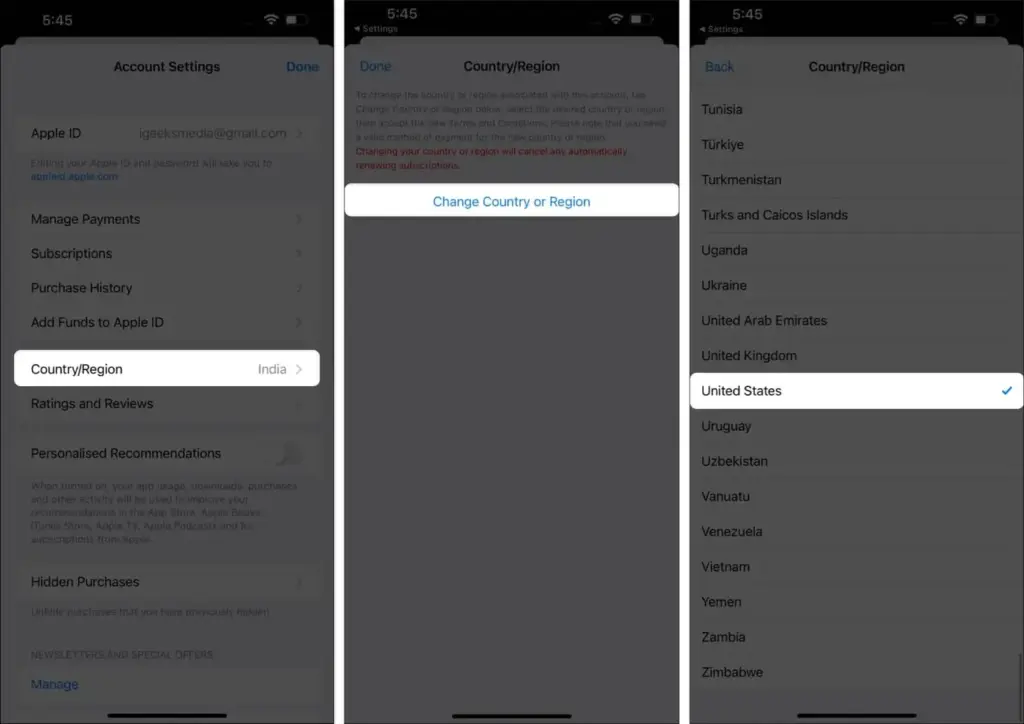
Step 3: Check Country/Region
Tap Country/Region. If it already says Australia, back out — Fortnite should be searchable, and you may just need to sign out and back in.
Step 4: Change the country if needed
If it shows a different country, tap Change Country or Region, select Australia, review the Terms & Conditions, then tap Agree twice to confirm.
Tip: Apple limits region changes to roughly once every 90 days, so avoid switching back and forth unnecessarily.
Pro tips
- Sign out and back into your Apple ID after a region change if downloads or updates don't start.
- Ignore outdated help pages or cached notices that still say Fortnite is unavailable in Australia — the App Store listing itself is the source of truth.
- You can't be signed into two Apple ID regions at once, so switch fully before checking the App Store again.
Troubleshooting
| Problem | What to do |
|---|---|
| Fortnite doesn't show up when you search the App Store | Confirm your Apple Account Country/Region is set to Australia under Settings > your name > Media & Purchases > View Account, then sign out and back in. |
| You previously used a US or EU Apple ID to get Fortnite | Switch back to your Australian Apple ID; the workaround account is no longer needed now that Fortnite is listed natively in Australia. |
| The region change option is greyed out or won't let you switch | Clear any Apple Account balance, cancel subscriptions that block region changes, and leave Family Sharing groups before trying again. |
| An old article or Epic help page still says Australia is unsupported | Ignore it and check the App Store listing or Epic's live status page directly, since that notice predates the October 2026 ruling. |
Frequently asked questions
Is Fortnite actually available in Australia now?
Yes. Fortnite returned to the Australian App Store on October 22, 2026, after a Federal Court ruled against Apple in its long-running case with Epic Games.
Do I still need a US or overseas Apple ID to get Fortnite in Australia?
No. Fortnite is now listed natively for Apple Accounts with the Country/Region set to Australia, so the old workaround is unnecessary for most users.
What iPhone do I need to run Fortnite?
Apple’s listing requires iOS 17.0 or later, on devices from iPhone XS, iPhone 11, iPhone 12 Mini, or iPhone SE 3 onward.
Could Fortnite disappear from the Australian App Store again?
It’s possible. Apple has said it will appeal the court’s decision, though the ruling is expected to hold given how long the case has taken to resolve.
Is Fortnite free to download?
Yes, Fortnite is free with optional in-app purchases, so no payment method is required just to install it.
With Fortnite back on Australia’s App Store, downloading it is now as simple as searching and tapping Get, as long as your Apple Account region is correct. For more on how this change came about, see our earlier coverage of Fortnite’s return to the App Store, and check Apple’s own guide on changing your Apple Account country or region if you run into trouble.
Sources and further reading
- Beebom — Fortnite Returns to iOS in Australia as Epic Games Scores Major Court Victory
- Apple Support — Change your Apple Account country or region – Apple Support (AU)
- iGeeksBlog — How to change your App Store country/region? – iGeeksBlog
- Tech My Money — Fortnite Returns to Australia's App Store After Court Order