Close Menu
DroidfeatsDroidfeats

    Subscribe to Updates

    Join our most passionate readers to get instant access to tech tips as they arrive!

    What's Hot
    BMX SolidSafe Air 5K Power Bank Offers Ultra-Thin iPhone Charge

    BMX SolidSafe Air 5K Power Bank Offers Ultra-Thin iPhone Charge

    May 1, 2026
    Gamers’ Player Count Obsession Reportedly Hurting New Games

    Gamers’ Player Count Obsession Reportedly Hurting New Games

    May 1, 2026
    Do a Barrel Roll 20 Times on Google & other search games (2026)

    Do a Barrel Roll 20 Times on Google & other search games (2026)

    May 1, 2026
    Facebook X (Twitter) Instagram
    • About
    • Privacy Policy
    • DMCA
    • Team
    • Get In Touch
    Facebook X (Twitter) Instagram Pinterest RSS
    DroidfeatsDroidfeats
    • Home
    • News
    • Apps
    • Tips
    • VPN
    • #TheBest
      • Get GCam Ports
      • USB Drivers
      • Get Magisk
      • Get Play Store
      • Get ADB binaries
    • LoL Tier List
    Best Deals
    DroidfeatsDroidfeats
    Nothing

    Get the Google Camera Port for Nothing Phone (1)

    Saeed Ashif AhmedBy Saeed Ashif AhmedMarch 17, 2024No Comments3 Mins Read
    Share
    Facebook Twitter LinkedIn Pinterest Reddit Email

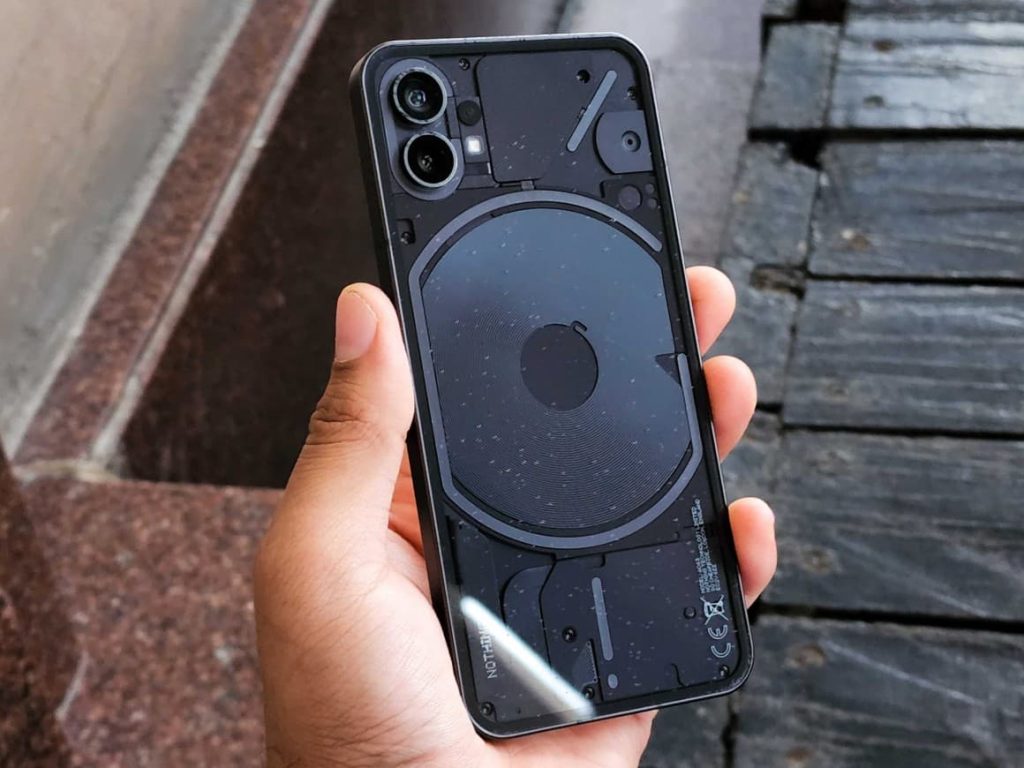
    If you’re the proud owner of a Nothing Phone (1) and are seeking to enhance your photography experience, you’ve come to the right place. This article is made to help you install Google Camera on your device.

    Gcam for Nothing-Phone-1

    The availability of Google Camera for Nothing Phone 1 is made possible by the relentless efforts of dedicated developers like Arnova8G2, BSG, and Urnyx05. They have been tirelessly porting GCam APK files to various devices, and now, the Nothing Phone 1 is part of that list.

    By following this guide, you’ll be able to effortlessly download and install the Google Camera app on your smartphone. This will unlock a suite of advanced features and significantly improve the quality of your photos. So, let’s get started on enhancing your smartphone photography experience.

    Download Gcam Port for Nothing Phone (1)

    For those of you who are eager to enhance your Nothing Phone 1’s camera capabilities, the Google Camera Ports are available for download. These ports have been thoroughly tested and are among the most compatible GCam Ports currently available.

    We’ve gathered the best of the best based on user reviews from Reddit, XDA Developers (now known as XDA Forums), and YouTube. These sources are trusted platforms where tech enthusiasts share their experiences and recommendations.

    To get started, simply download the APK file from the provided links. Once you have the file, follow the installation guidelines below to get the Google Camera up and running on your Nothing Phone 1. Let’s dive into the world of superior smartphone photography!

    • Google Camera 7.3.018 APK [Recommended]
    • GCam by Arnova8G2
    • GCam 8.4 – MGC_8.4.600_A10_V13_MGC.apk
    • GCam 8.5 – MGC_8.5.300_A10_V2_MGC.apk
    • Google Camera 7.3.021 APK
    • GCam_6.1.021_Advanced_V1.4.032219.1950
    • Google Camera 8.1 APK for Android

    How to Install Google Camera on Nothing Phone (1)

    The process of installing the Google Camera APK file is straightforward and doesn’t require you to root your device. Here are the steps:

    1. Download the GCam APK file: Use the provided download link to download the GCam APK file, then tap on it to begin the installation process.
    2. Enable Unknown Sources: To install third-party APK files, you need to enable the Unknown Sources option on your device. Navigate to your device’s Settings menu, then go to Security/Privacy and enable the option. If you’ve already done this, you can skip this step.
    3. Install the APK file: After enabling Unknown Sources, the package installer will launch. Tap on the Install button to proceed with the installation.
    4. Open and use the app: Once the installation is complete, you can open and start using the Google Camera app. Enjoy!

    If the camera app doesn’t work as expected, you may need to enable the Camera2API by using build.prop. This step is not necessary for every device. To do this, use the following command:

    Persist.vender.camera.HAL3.enable=1

    We hope this guide assists you in successfully installing the Google Camera ported app on your Nothing Phone (1) handset. If you encounter any issues, please don’t hesitate to leave a comment below.

    GCam Google Google Apps Google Camera
    Follow on Google News Follow on Facebook
    Share. Facebook Twitter Pinterest LinkedIn Tumblr Email
    Previous ArticleHead-to-head AI battle: Microsoft’s Copilot Pro goes global!
    Next Article WhatsApp Beta hints at a big security upgrade! What could It be?
    Saeed Ashif Ahmed
    • Website
    • Facebook
    • X (Twitter)
    • LinkedIn

    Saeed Ashif Ahmed is passionate about emerging technologies and their potential to create a fairer world. A car enthusiast and civil engineer, he loves cricket and cherishes his alma mater, Navodaya Vidyalaya (JNV).

    Related Posts

    MX Player Custom Codec [AC3, DTS, MLP, TrueHD, and more]
    Apps

    MX Player Custom Codec [AC3, DTS, MLP, TrueHD, and more]

    May 1, 2026
    Fitbit Account Migration to Google Mandatory by May 19 Deadline
    News

    Fitbit Account Migration to Google Mandatory by May 19 Deadline

    April 30, 2026
    YouTube PiP Global Rollout Begins for All Users
    News

    YouTube PiP Global Rollout Begins for All Users

    April 30, 2026
    Add A Comment
    Leave A Reply Cancel Reply

    Top Posts
    MX Player Custom Codec [AC3, DTS, MLP, TrueHD, and more]

    MX Player Custom Codec [AC3, DTS, MLP, TrueHD, and more]

    May 1, 2026183K
    Do a Barrel Roll 20 Times on Google & other search games (2026)

    Do a Barrel Roll 20 Times on Google & other search games (2026)

    May 1, 202658,502
    47 best root apps for Android devices in 2025 (NEW LIST – Updated)

    47 best root apps for Android devices in 2025 (NEW LIST – Updated)

    April 16, 202529,790
    Stay In Touch
    • Facebook
    • Twitter
    • Instagram
    • Pinterest
    • Reddit
    • Telegram
    Latest News
    BMX SolidSafe Air 5K Power Bank Offers Ultra-Thin iPhone Charge News

    BMX SolidSafe Air 5K Power Bank Offers Ultra-Thin iPhone Charge

    Palumbo AngelaMay 1, 2026
    Gamers’ Player Count Obsession Reportedly Hurting New Games News

    Gamers’ Player Count Obsession Reportedly Hurting New Games

    Leisangthem RajshreeMay 1, 2026
    Google Search & Discover Add Preferred Sources Setting News

    Google Search & Discover Add Preferred Sources Setting

    Leisangthem RajshreeMay 1, 2026

    Subscribe to Updates

    Join our most passionate readers to get instant access to tech tips as they arrive!

    Most Popular
    MX Player Custom Codec [AC3, DTS, MLP, TrueHD, and more]

    MX Player Custom Codec [AC3, DTS, MLP, TrueHD, and more]

    May 1, 2026183K
    Do a Barrel Roll 20 Times on Google & other search games (2026)

    Do a Barrel Roll 20 Times on Google & other search games (2026)

    May 1, 202658,502
    47 best root apps for Android devices in 2025 (NEW LIST – Updated)

    47 best root apps for Android devices in 2025 (NEW LIST – Updated)

    April 16, 202529,790
    Our Picks
    BMX SolidSafe Air 5K Power Bank Offers Ultra-Thin iPhone Charge

    BMX SolidSafe Air 5K Power Bank Offers Ultra-Thin iPhone Charge

    May 1, 2026
    Gamers’ Player Count Obsession Reportedly Hurting New Games

    Gamers’ Player Count Obsession Reportedly Hurting New Games

    May 1, 2026
    Do a Barrel Roll 20 Times on Google & other search games (2026)

    Do a Barrel Roll 20 Times on Google & other search games (2026)

    May 1, 2026

    Subscribe to Updates

    Join our most passionate readers to get instant access to tech tips as they arrive!

    Facebook X (Twitter) Instagram Pinterest
    • About Us
    • Privacy Policy
    • Terms
    • Jobs
    • Contact
    © 2026 Droidfeats. All rights reserved.

    Type above and press Enter to search. Press Esc to cancel.

    Ad Blocker Enabled!
    Ad Blocker Enabled!
    Our website is made possible by displaying online advertisements to our visitors. Please support us by disabling your Ad Blocker.