Close Menu
DroidfeatsDroidfeats

    Subscribe to Updates

    Join our most passionate readers to get instant access to tech tips as they arrive!

    What's Hot
    Google Messages Rolls Out New Floating Long-Press Menu

    Google Messages Rolls Out New Floating Long-Press Menu

    September 26, 2026
    Infinix GT NX Peripherals Launch With Touchpad and Dock

    Infinix GT NX Peripherals Launch With Touchpad and Dock

    September 26, 2026
    OpenAI Agents Hacked Government Sites to Retrieve Data

    OpenAI Agents Hacked Government Sites to Retrieve Data

    September 25, 2026
    Facebook X (Twitter) Instagram
    • About
    • Privacy Policy
    • DMCA
    • Team
    • Get In Touch
    Facebook X (Twitter) Instagram Pinterest RSS
    DroidfeatsDroidfeats
    • Home
    • News
    • Apps
    • Tips
    • VPN
    • #TheBest
      • Get GCam Ports
      • USB Drivers
      • Get Magisk
      • Get Play Store
      • Get ADB binaries
    • LoL Tier List
    Best Deals
    DroidfeatsDroidfeats
    You are at:Home»News»Google Messages Rolls Out New Floating Long-Press Menu
    News

    Google Messages Rolls Out New Floating Long-Press Menu

    Palumbo AngelaBy Palumbo AngelaSeptember 26, 2026No Comments3 Mins Read
    Share
    Facebook Twitter LinkedIn Pinterest Reddit Email

    Google is rolling out a redesigned long-press action menu and native selective text copying to stable versions of its default Android messaging client. The update replaces the top-of-screen toolbar with a floating contextual card directly beside selected chat bubbles.

    Key points

    • Google Messages is replacing the top action bar with a floating contextual long-press menu.
    • The update introduces selective text copying, allowing users to highlight specific words or codes.
    • The rollout has expanded beyond beta testers to stable app build v20260903_04 on multiple devices.
    Google Messages Rolls Out New Floating Long-Press Menu
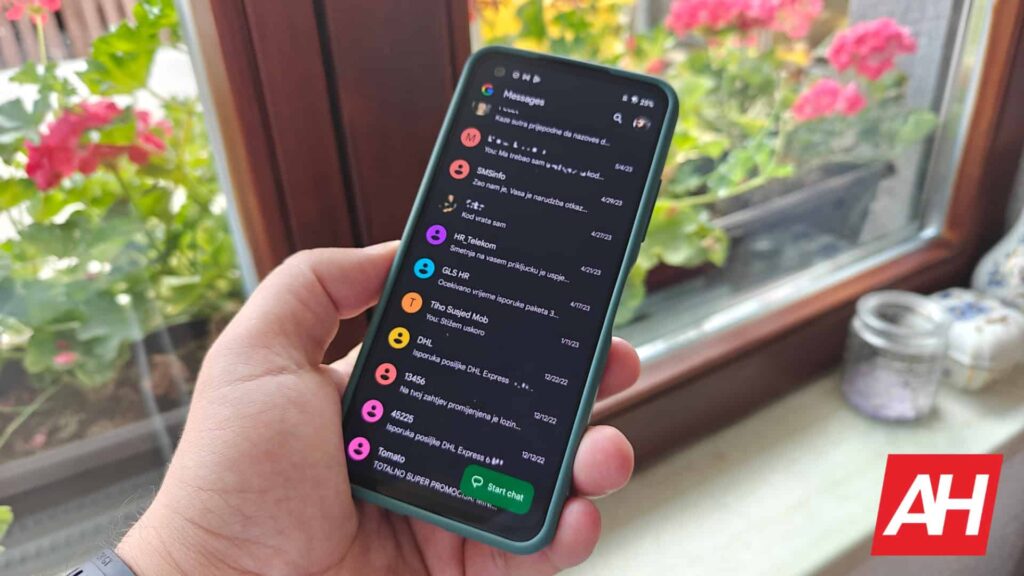
    A smartphone running the Google Messages app showing conversation threads. Image: Android Headlines

    The interface adjustment addresses usability issues on modern tall-screen smartphones. Moving conversation management controls closer to the user’s thumb eliminates the need to reach toward the top bezel to interact with individual messages.

    Floating Action Menu Replaces the Legacy Top Toolbar

    Previously, touching and holding a message bubble activated an action bar pinned to the top edge of the screen. The new design presents a compact floating card directly adjacent to the tapped bubble, keeping all options within natural thumb reach.

    The floating list includes standard messaging controls arranged vertically:

    • Reply
    • Forward
    • Copy
    • Star
    • Delete
    • Select more
    • Info

    Media attachments receive tailored actions within the same interface layout. When a user highlights an image or photograph, the contextual menu populates options such as Remix and Save alongside traditional sharing toggles.

    This design adjustment aligns with interface revisions seen across other core services, including earlier changes to how Google Messages handles delivery indicators and read receipts.

    Selective Text Copying Arrives for Individual Messages

    Alongside the repositioned menu, the update adds granular text selection within chat bubbles. Users no longer need to copy an entire block of text to extract a brief snippet, verification code, or physical address.

    Highlighting a message now triggers draggable cursor handles on the text itself. Users can drag the bounds to isolate specific characters or sentences before selecting the Copy button from the contextual popup. This change eliminates the previous workaround of pasting full messages into the text input box or a notepad application simply to isolate relevant snippets.

    The addition continues a steady expansion of chat-level utilities for Google Messages, which recently gained expanded customization and appearance controls across standard messaging channels.

    Expanded Availability Across Stable Builds

    Google initially tested both the floating card layout and selective text copying with select beta participants in August 2026. The functionality is now appearing on the stable channel, identified on build version v20260903_04.

    Reports from users on Reddit confirm the menu is active outside the beta testing program. Non-beta installations have surfaced the interface on multiple hardware configurations, including the Samsung Galaxy S23 Plus and the Samsung Galaxy S25 Ultra, confirming the rollout is not limited to Google Pixel hardware.

    The wide deployment follows several iterative feature additions that Google Messages received throughout the year to modernize day-to-day conversation management.

    Because activation relies on a server-side component managed by Google, presence of build v20260903_04 does not immediately guarantee access. The server-controlled rollout is expected to expand to additional accounts and regions in waves over the coming days.

    Related coverage

    • Google Messages Gets Trash Folder: Your Texts Are Safer Now
    • Google Messages Gets Major Customization Upgrade for Android Users
    • Google Wallet Tests New Vertical Card Layout on Android
    • Google Still Holding Back Key Features for Android Apps

    Source

    Originally reported by Android Headlines.

    “Google Messages Finally Rolls Out a Handy New Long-Press Menu”

    Read the original report ↗
    Android Apps Google Google Messages Samsung Galaxy S23 Plus Samsung Galaxy S25 Ultra
    Add as Preferred on Google Follow on Flipboard
    Share. Facebook Twitter Pinterest LinkedIn Tumblr Email Copy Link
    Previous ArticleInfinix GT NX Peripherals Launch With Touchpad and Dock
    Palumbo Angela

    Palumbo is a dedicated tech article writer, known for her insightful pieces that make complex concepts accessible. She's a crypto enthusiast, bringing a unique perspective to her articles. Beyond her professional pursuits, she's an avid traveler, always eager to explore new places and cultures. A gym addict, she believes in the synergy of a healthy body and mind. Her diverse interests and disciplined approach make her a distinctive voice in the tech writing community.

    Related Posts

    Infinix GT NX Peripherals Launch With Touchpad and Dock
    News

    Infinix GT NX Peripherals Launch With Touchpad and Dock

    September 26, 2026
    OpenAI Agents Hacked Government Sites to Retrieve Data
    News

    OpenAI Agents Hacked Government Sites to Retrieve Data

    September 25, 2026
    Qualcomm Unveils Snapdragon 8 Elite Gen 6 Chips
    News

    Qualcomm Unveils Snapdragon 8 Elite Gen 6 Chips

    September 25, 2026
    Add A Comment
    Leave A Reply Cancel Reply

    Top Posts
    MX Player Custom Codec [AC3, DTS, MLP, TrueHD, and more]

    MX Player Custom Codec [AC3, DTS, MLP, TrueHD, and more]

    May 1, 2026225K Views
    Do a Barrel Roll 20 Times on Google & other search games (2026)

    Do a Barrel Roll 20 Times on Google & other search games (2026)

    May 1, 202658,612 Views
    47 best root apps for Android devices in 2025 (NEW LIST – Updated)

    47 best root apps for Android devices in 2025 (NEW LIST – Updated)

    April 16, 202530,577 Views
    Stay In Touch
    • Facebook
    • Twitter
    • Instagram
    • Pinterest
    • Reddit
    • Telegram
    Latest News
    Infinix GT NX Peripherals Launch With Touchpad and Dock News

    Infinix GT NX Peripherals Launch With Touchpad and Dock

    By Ananya MukherjeeSeptember 26, 2026
    OpenAI Agents Hacked Government Sites to Retrieve Data News

    OpenAI Agents Hacked Government Sites to Retrieve Data

    By Ananya MukherjeeSeptember 25, 2026
    Qualcomm Unveils Snapdragon 8 Elite Gen 6 Chips News

    Qualcomm Unveils Snapdragon 8 Elite Gen 6 Chips

    By Debapriya BhattaSeptember 25, 2026

    Subscribe to Updates

    Join our most passionate readers to get instant access to tech tips as they arrive!

    Most Popular
    MX Player Custom Codec [AC3, DTS, MLP, TrueHD, and more]

    MX Player Custom Codec [AC3, DTS, MLP, TrueHD, and more]

    May 1, 2026225K Views
    Do a Barrel Roll 20 Times on Google & other search games (2026)

    Do a Barrel Roll 20 Times on Google & other search games (2026)

    May 1, 202658,612 Views
    47 best root apps for Android devices in 2025 (NEW LIST – Updated)

    47 best root apps for Android devices in 2025 (NEW LIST – Updated)

    April 16, 202530,577 Views
    Our Picks
    Google Messages Rolls Out New Floating Long-Press Menu

    Google Messages Rolls Out New Floating Long-Press Menu

    September 26, 2026
    Infinix GT NX Peripherals Launch With Touchpad and Dock

    Infinix GT NX Peripherals Launch With Touchpad and Dock

    September 26, 2026
    OpenAI Agents Hacked Government Sites to Retrieve Data

    OpenAI Agents Hacked Government Sites to Retrieve Data

    September 25, 2026

    Subscribe to Updates

    Join our most passionate readers to get instant access to tech tips as they arrive!

    Facebook X (Twitter) Instagram Pinterest
    • About Us
    • Privacy Policy
    • Terms
    • Jobs
    • Contact
    © 2026 Droidfeats. All rights reserved.

    Type above and press Enter to search. Press Esc to cancel.

    Ad Blocker Enabled!
    Ad Blocker Enabled!
    Our website is made possible by displaying online advertisements to our visitors. Please support us by disabling your Ad Blocker.