Quick answer
To redeem Turbo Soccer codes, open the Shop icon on the left of the screen, select the More tab, paste your code into the input field, and tap Redeem.
Turbo Soccer rewards players who track down its codes with coin bonuses and exclusive cosmetic packs for their car, but the redemption screen is easy to miss if you don’t know where to look.
This walks you through the standard Shop menu route, the alternate Settings path some players see instead, and what to do when a code refuses to activate.
Before you start
- Difficulty Easy
- Time needed 3 minutes
- Works on Roblox app, all platforms (PC, mobile, console)
What you'll need
- A Roblox account with Turbo Soccer installed
- The in-game tutorial completed
- An active, unused Turbo Soccer code
Redeem codes through the Shop menu
This is the route most players see and the one DroidFeats recommends trying first.
Step 1: Open Turbo Soccer and finish the tutorial
Launch Turbo Soccer from the Roblox app. If you’re new to the game, complete the introductory tutorial first, since the redemption screen stays locked until you do.
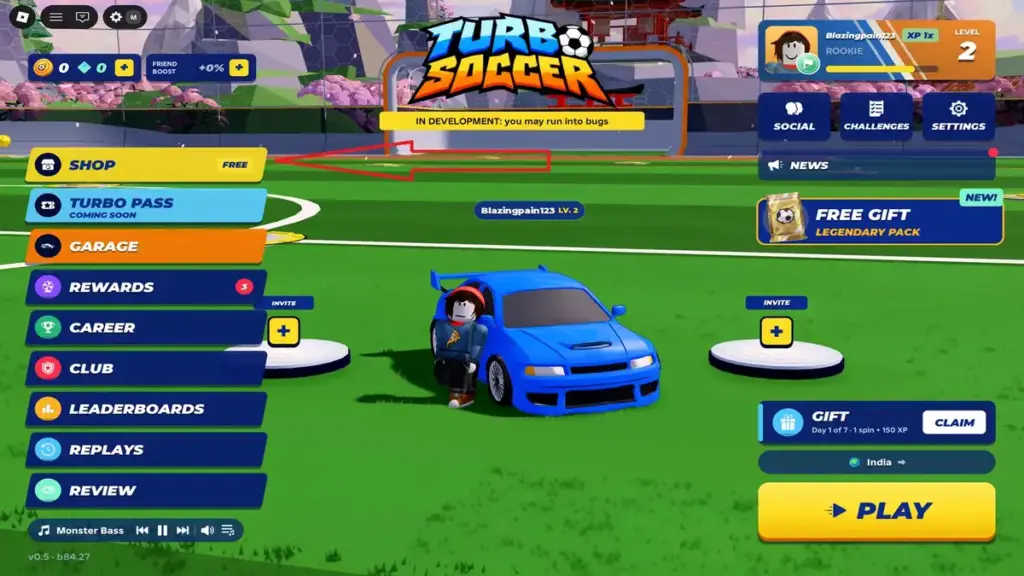
Step 2: Select the Shop icon
Tap the Shop icon on the left side of the screen to open the in-game store.
Step 3: Switch to the More tab
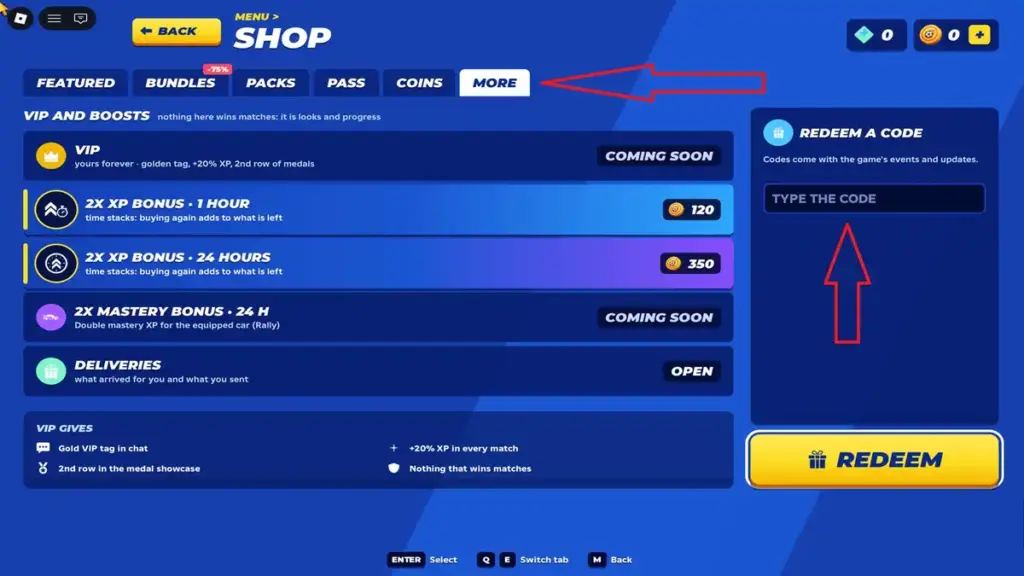
At the top of the Shop menu, tap More. This opens the section with the code redemption box.
Step 4: Enter your code
Tap the text field on the right side of the menu and paste or type your code exactly as written.
Tip: Copy and paste the code instead of typing it to avoid stray spaces or misread characters.
Step 5: Tap Redeem
Press Redeem to claim your coins or pack. A confirmation message should appear, and the reward lands in your inventory or coin balance right away.
Redeem codes through the Settings menu (alternate route)
Some versions of Turbo Soccer route code redemption through Settings instead of the Shop, so try this if the Shop icon doesn’t show a code box for you.
Step 1: Open Settings
From the main game screen, tap the Settings button, or press M on a keyboard.
Step 2: Scroll to the codes option
Inside Settings, tap More. On some versions, the code box sits further down the Settings list rather than under a separate tab.
Step 3: Enter and redeem your code
Type your code into the text box, then tap Redeem to receive the reward.
Pro tips
- Join the official Turbo Soccer Discord server, since that's where the developer posts new codes first.
- Redeem codes as soon as you get them, since Turbo Soccer codes can expire without any warning.
- Copy codes directly from a verified list rather than retyping them, since letter case and spacing matter if a code turns out to be case-sensitive.
Troubleshooting
| Problem | What to do |
|---|---|
| The code won't redeem and shows an error | Check for typos or extra spaces, and copy and paste the code exactly as listed rather than typing it manually. |
| A brand-new code isn't working for anyone | Close Turbo Soccer completely and relaunch it. This moves you to a different server, which is often running a newer build where the code is active. |
| The code was accepted once but won't work again | Most Turbo Soccer codes are one-use per account, so a repeat entry will fail even if the code itself is still valid for other players. |
| The redemption screen won't open at all | Make sure you've completed the in-game tutorial first, since the Shop and Settings code boxes stay locked until that sequence finishes. |
Frequently asked questions
Why can't I find the code box in Turbo Soccer?
You likely haven’t finished the tutorial yet, since the redemption screen in both the Shop and Settings menus stays locked until you do.
Are Turbo Soccer codes case-sensitive?
Reports conflict: some sources say the system ignores letter case, while others treat Roblox codes generally as case-sensitive. Paste codes exactly as written to stay safe.
How often does Turbo Soccer release new codes?
There’s no fixed schedule. New codes tend to appear around game updates, and the developer posts them on the official Discord server.
Where can I find the current list of working codes?
Check the Turbo Soccer codes roundup on DroidFeats, which is updated as new codes appear and old ones expire.
Once you know the Shop and Settings paths, redeeming a Turbo Soccer code takes seconds, so check the latest Turbo Soccer code list regularly and claim new rewards before they expire.
Sources and further reading
- Sportskeeda — Turbo Soccer codes (October 2026)
- PCGamesN — Turbo Soccer codes (October 2026)
- Dexerto — Turbo Soccer codes (October 2026) – Dexerto
- Rocodes Gg — Turbo Soccer Codes October 2026 – RoCodes