Quick answer
Open the in-game Menu in Fisch, scroll to the Codes section (or go to Settings > Codes), type an active code into the text box, and press Enter to claim it.
Fisch hands out free currency, bobbers, bait, and luck boosts through codes, but the redemption box is tucked inside the game itself rather than on a website.
You will open the in-game menu, find the Codes field, and type in an active code to claim its reward on Android, iOS, PC, or console.
Before you start
- Difficulty Easy
- Time needed 3 minutes
- Works on Fisch on Android, iOS, PC, Mac, and console via the Roblox app
What you'll need
- Roblox app or desktop client installed
- Active Roblox account logged in
- Stable internet connection
- A current Fisch code
Important
- Never enter your Roblox password on third-party sites promising unlimited luck or free rods, since these are scams.
- Fisch codes only work inside the game's own Codes field, not on the general roblox.com/redeem page.
Redeem a Code Inside Fisch
This works the same way on every platform since Fisch runs through the Roblox client.
Step 1: Launch Roblox and join Fisch
Open the Roblox app and load the Fisch experience from your games list or search.
Wait until your character fully spawns in before continuing.
Step 2: Open the in-game Menu
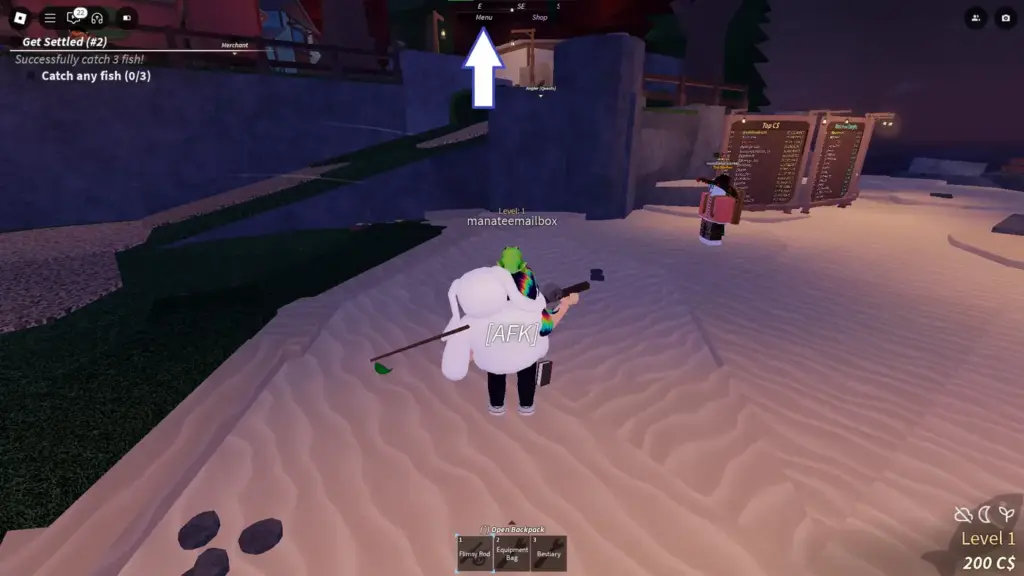
Tap or click the Menu button at the top center of the screen.
On PC, you can also press the M key instead of clicking.
Step 3: Scroll down to the Codes section
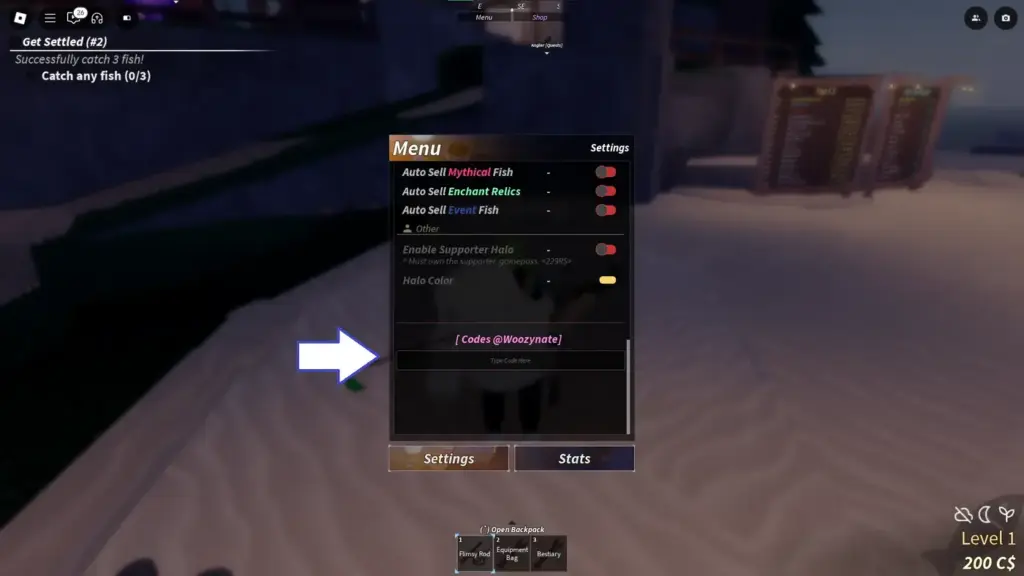
In the window that opens, scroll all the way to the bottom until you reach the Codes section, sometimes labeled with a developer tag like “[Codes @woozynate]”.
On some newer UI layouts, tap Open Settings first, then select Codes from the left sidebar.
Step 4: Tap the code text box
Tap or click inside the box labeled Type Code Here to bring up your keyboard.
Step 5: Enter the active code
Type or paste the code exactly as written, double-checking for extra spaces if you pasted it.
Codes are generally not case-sensitive, but matching the exact casing avoids odd syntax bugs.
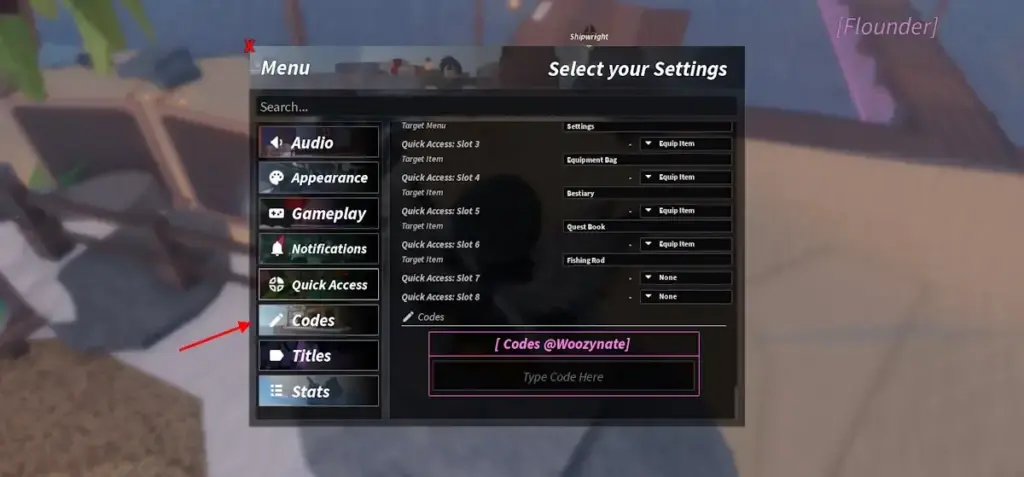
Step 6: Press Enter to claim your reward
Press Enter on a keyboard, or tap the blue checkmark or Go/Done key on a mobile virtual keyboard.
A confirmation message will name what you received, and the items drop straight into your inventory or rod customization menus.
Tip: Check your bait, bobber, or rod customization screens if you redeemed cosmetics rather than currency.
Pro tips
- Check the chest below the code box only if you want the separate "Like and Join the Group" reward, since it is not required to redeem codes.
- Redeem codes as soon as you see them, since Fisch's developer expires most of them within weeks.
- Keep an eye on official code roundups like beebom.com or eurogamer.net so you don't miss limited-time rewards.
- If you're also farming materials for the FischFright 3 event, pair codes with our guide on Free Luck boosts from other Roblox games.
- Each code only works once per Roblox account, so there's no benefit to re-entering a claimed code.
Troubleshooting
| Problem | What to do |
|---|---|
| The code shows "Outdated" | The developer has expired that code and it cannot be reclaimed, so look for a current one instead. |
| The code fails or does nothing when submitted | Retype it manually instead of pasting, since copied codes sometimes carry an invisible trailing space. |
| You get an "Already Redeemed" message | That code was already claimed on your account; check your inventory or rod customization menus for the items. |
| The mobile keyboard won't submit the code | Tap the blue checkmark or Go/Enter button on the virtual keyboard instead of tapping elsewhere on the screen. |
Frequently asked questions
Can I redeem Fisch codes on the Roblox website?
No. Fisch codes only work inside the Codes field in the game itself, not on roblox.com/redeem.
Are Fisch codes case-sensitive?
Generally no, but typing a code in its exact casing avoids occasional syntax bugs.
Can I use the same code twice?
No, each code can only be claimed once per Roblox account.
Where do new Fisch codes come from?
The developer, Fisching, typically shares new codes through the game’s official Discord server during updates and events.
With the Codes menu bookmarked in your memory, redeeming new Fisch drops takes seconds each time one goes live, and checking a current code list before you log in saves you from typing in anything expired.
Sources and further reading
- Beebom — Roblox Fisch Codes (October 2026)
- Eurogamer.net — Fisch codes October 2026
- VG247 — Fisch codes for October 2026
- MuMuPlayer — Roblox: Fisch Latest Codes & How to Redeem (Jan 2026)