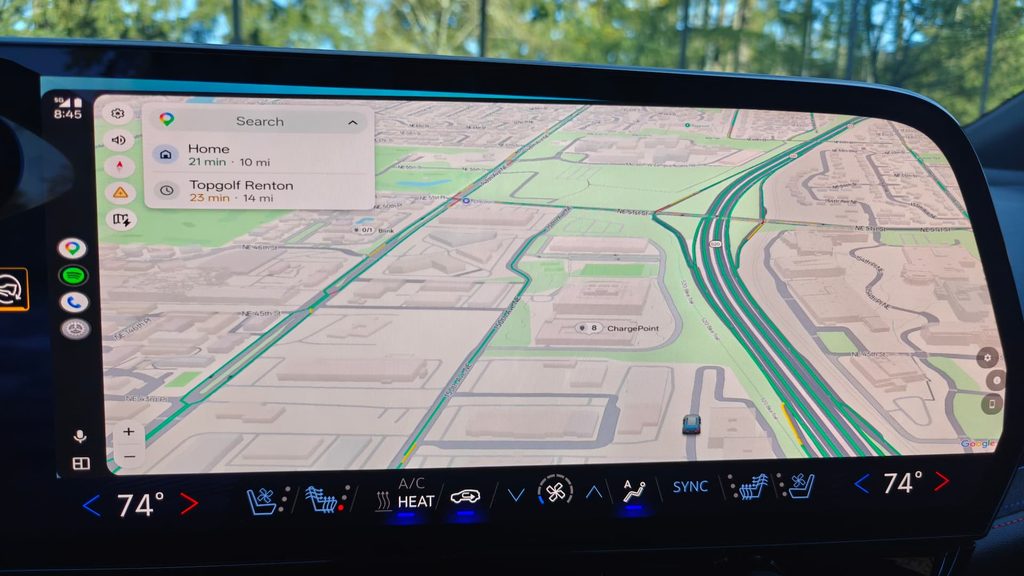
When General Motors removed Apple CarPlay and Android Auto from its 2024 and newer electric vehicles, the reasoning was that Google built-in would make phone projection unnecessary. A lot of owners disagreed. One of them, an XDA member posting as Lurker1126, did something about it.
The result is OpenAutoLink, an open source project that runs the complete Android Auto protocol stack directly on the car’s Android Automotive OS head unit. No single board computer. No USB dongle. No aftermarket adapter box. The car app and your phone talk to each other directly.
This post covers what the project actually does, how the architecture works, which vehicles have been proven, how installation works on a locked GM head unit, and where the rough edges still are.
Quick summary
| Question | Short answer |
|---|---|
| What is it? | An open source Android Auto receiver that runs natively on an AAOS head unit |
| Hardware needed? | None beyond your car and your Android phone |
| Connection types | Wireless over Wi-Fi (WPP) and wired over USB (AOA v2) |
| Standout feature | Real EV battery and range data forwarded into Google Maps |
| Confirmed vehicles | 2024 Blazer EV, 2025 to 2026 Equinox EV, 2027 Bolt |
| CarPlay support? | No. Android only |
| Licence | GPL v3.0, source on GitHub |
| Discussion | XDA Forums, Themes / Apps / Mods |
Why the project exists
Starting with the 2024 model year, GM shipped its EVs with Google built-in and no phone projection at all. The Blazer EV, Equinox EV, Silverado EV and Cadillac Lyriq all landed without Android Auto or CarPlay.
Android Automotive OS is, underneath, still Android. That is the opening OpenAutoLink walks through. If the head unit can run a Play Store app, and that app can open a network socket, speak TLS, decode H.264 and render to the screen, then there is no technical reason it cannot act as an Android Auto receiver. The barrier was never capability. It was that nobody had written the receiver.
Earlier community attempts solved the problem with hardware. A Raspberry Pi in the glovebox ran a bridge binary and relayed the session to the car over Ethernet. It worked, but it meant buying a board, wiring it in, and keeping it powered.
OpenAutoLink removed that entire layer. The project maintainer describes the current design as running the whole session natively on the head unit, which as far as the community can tell is a first for AAOS vehicles that never shipped with Android Auto.
How OpenAutoLink works
The car app embeds aasdk v1.6, the C++ Android Auto protocol library from the OpenCarDev project, through JNI. That native layer handles the parts that have to be exactly right: the TLS handshake, encryption, message framing and channel multiplexing. The Kotlin layer above it owns transport, video decoding, audio routing, sensors, input handling and the user interface.
The maintainer runs a personal fork of aasdk that adds navigation status extensions and new sensor types for the EV energy model, both of which came out of heavy protocol reverse engineering.
Wireless mode on Android Auto 17.4 and newer
Android phone                         AAOS head unit
┌────────────────────┐               ┌────────────────────────┐
│ Android Auto       │◄── BT WPP ──► │ OpenAutoLink           │
│ OAL Companion      │◄── Wi-Fi/TCP► │ aasdk C++ via JNI      │
└────────────────────┘               └────────────────────────┘
The head unit advertises the Android Auto Wireless service over Bluetooth and hands over the car access point’s details, which is exactly how a factory wireless Android Auto head unit behaves. On the GM network topology, Android Auto then connects to a loopback proxy held by the companion app, which relays the session across the vehicle network.
Two practical consequences follow. First, the companion app on the phone is required for wireless. Second, advertising, discovery and transport all stay pinned to one explicitly selected head unit interface, with no fallback across interfaces, which is why setup asks for a BSSID rather than just an SSID.
Wired mode over USB
Android phone ───── AOA v2 / bulk USB ─────► OpenAutoLink on AAOS
USB uses the Android Open Accessory v2 protocol and does not need the companion app at all. Plug in, accept the prompt, and the session starts.
The legacy Wi-Fi modes
Older releases offered Car Hotspot mode, where phones joined the car’s built in access point like any saved network, and Phone Hotspot mode, where the car joined the phone’s hotspot. Car Hotspot mode even supported two phones at once with a one tap switcher.
Android Auto 17.4 disabled the startup entry point those modes relied on. They still exist for anyone stuck on 17.3 or older, but they are no longer a working fallback on current Android Auto builds. The original SBC bridge architecture is preserved on the bridge-mode branch for anyone who already built that setup.
The feature that nobody else has
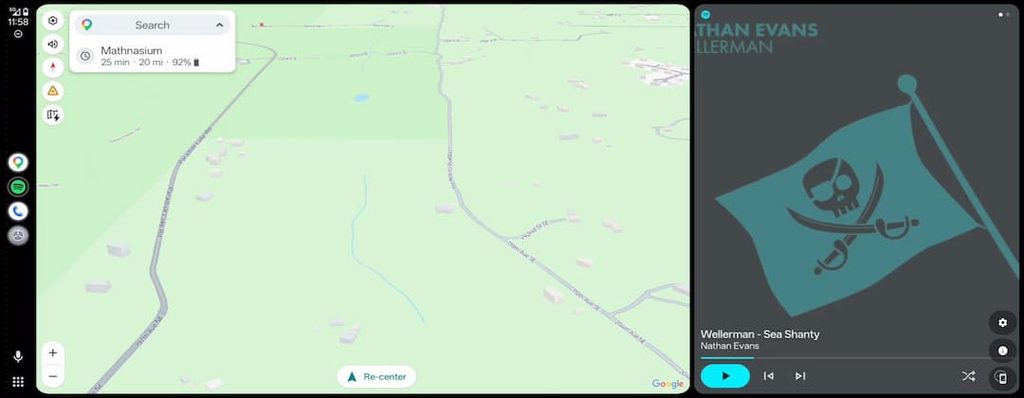
This is the part of the project that generated the most attention on XDA, and it deserves it.
Native Google Maps on AAOS knows your battery state because the car tells it. When you project Android Auto from a phone, Maps normally has no idea what the car’s battery is doing. OpenAutoLink closes that gap. It reads battery percentage, range, fuel type and charge port state from the vehicle’s VHAL and forwards them into the Android Auto session as the standard vehicle energy model sensor.
The result is battery aware navigation inside projected Android Auto, showing estimated battery on arrival the same way the built-in app does. The maintainer’s claim on XDA was blunt: no other Android Auto solution does this, including official OEM implementations.
Getting there required building a substitute for something Google keeps private. Native AAOS Maps uses a per vehicle profile containing charge curves, aerodynamic data and real DC fast charging power, and third party apps cannot read it. OpenAutoLink ships a tunable energy model instead, built from live VHAL data plus an EPA derived profile database covering dozens of popular EVs including the Blazer EV, Lyriq, Hummer EV, Mach-E, F-150 Lightning, Model 3 and Y, IONIQ 5 and 6, EV6, EV9, ID.4, Rivian R1T and R1S, Polestar 2, 3 and 4, and several others.
Four driving rate modes are available:
- Derived, the default, which uses the dashboard’s own range estimate
- Multiplier, which scales that estimate between 0.50x and 1.50x to push Maps optimistic or pessimistic
- Manual, a direct Wh/km slider from 80 to 300
- Learned, which auto tunes from real driving by computing a rolling Wh/km from battery delta divided by distance delta
The Learned mode detail is a good example of the reverse engineering involved. GM blocks the standard odometer VHAL property, so distance has to be integrated from vehicle speed instead. The model also skips ticks while charging or regenerating, rejects outliers, and resets after long gaps.
Full feature list
- Android Auto protocol running natively on the head unit, no extra hardware
- Wireless projection using the factory style Bluetooth bootstrap plus Wi-Fi (WPP) on Android Auto 17.4 and newer
- USB projection using AOA v2
- EV battery percentage, range, fuel type and charge port data in Google Maps
- Instrument cluster support for turn by turn navigation and media metadata on supported vehicles
- Projected call controls that keep using the vehicle’s native Bluetooth hands free audio path
- Steering wheel controls for media, voice, calls and directional input
- Automatic reconnect across ignition cycles and head unit sleep and wake
- Multi phone support, with behaviour depending on Android Auto version and transport
- Wide display adaptation through configurable DPI, safe areas, margins and scaling
- H.264, H.265 and VP9 video, with manual tiers up to 1440p (2560×1440) and 4K (3840×2160) plus portrait equivalents
- Per codec seed filtering with configurable startup placeholder cutoffs
- Built in diagnostics covering transport status, network tools, a VHAL browser and optional log export
Vehicle compatibility
The project takes a careful line on compatibility. GM’s recent AAOS EVs share most of their infotainment platform, so a bug reported on one model is treated as an app, phone or setup observation rather than proof that a whole model is incompatible. Both OpenAutoLink and Android Auto are moving fast, so older reports often no longer reproduce.
| Vehicle | AAOS version | Evidence level | Notes |
|---|---|---|---|
| 2024 Chevrolet Blazer EV | 12L | Maintainer validated | Daily driver across many development builds |
| 2025 to 2026 Chevrolet Equinox EV | 14 reported | Community tested | One successful owner report plus earlier startup and USB issue reports |
| 2027 Chevrolet Bolt | Not stated | Owner demonstrated | Independent video and first hand owner report, with occasional reconnect slowness |
| Other GM AAOS EVs | Varies | Testing encouraged | Shared platform makes it plausible, but reports are wanted |
| Non-GM AAOS vehicles | Varies | Experimental | Networking, permissions and display zoning differ substantially |
The maintainer has an open call for Polestar and other non-GM AAOS owners. If your vehicle runs Android Automotive OS without Android Auto, the project wants testers. Installation, networking, audio, vehicle APIs and display behaviour all have to be proven per platform.
What you need
| Item | Requirement |
|---|---|
| Vehicle | A compatible AAOS head unit with no native Android Auto |
| Phone | An Android phone running Android Auto plus the OpenAutoLink Companion |
| Vehicle network | The car’s Wi-Fi access point for wireless, or a USB data connection |
| Installation route | A place in the maintainer’s Play test group, or your own Play Console account and signing key |
No projection hardware is needed. The one real friction point is delivery, covered next.
Installing OpenAutoLink
Step 1: the phone side
Download the latest companion APK from GitHub Releases, install it, and grant the permissions it asks for. Release APKs are signed with the project key, so a locally built debug APK cannot update over one without uninstalling first.
Step 2: the car side on a locked GM vehicle
This is where people get stuck, and it is worth being clear about it. GM production head units do not allow ADB installation or APK sideloading. You cannot download the car APK and push it to the car. Delivery has to go through Google Play.
Two routes exist.
Recommended: join the maintainer’s Play test group. It holds up to 100 people and still has open places. You send the Google account email used by your vehicle privately through the XDA thread or Reddit. The project is emphatic that you should not post your email in a public comment.
Independent: publish it yourself. The project ships a one command personal AAB builder that runs in Docker. It asks for your package identity once, then handles source updates, signing, native dependencies, versioning and verified AAB output. You run the same command for every later update. The critical warning is to preserve the state directory, because all future Play updates must use the same application ID and signing key. This route requires a Google Play Console developer account, which is a one time 25 USD registration fee.
Earlier versions of the XDA thread described the self publish route as the only option, so if you are reading old posts, the test group is the newer and much easier path.
Step 3: wireless setup on Android Auto 17.4 or newer
- Install matching current releases of both the car app and the companion app
- Enable the car’s Wi-Fi access point
- On the car, go to Settings, then Transport, then select Wireless (WPP)
- Enter the access point SSID, password and BSSID, then pick the WPP network interface serving that access point. The companion can send the SSID and BSSID over Bluetooth instead of you typing them
- Re-pair the phone to the car over Bluetooth after updating
- Keep the Bluetooth Phone calls profile enabled. Media audio can be turned off
- Remove any old Car WiFi entry from the companion so it does not compete with Android Auto for the same radio
- Select the car in the companion’s Auto-Start device list
- Save and reconnect
One non-obvious note from the project docs: the car’s hotspot does not need an active data plan or OnStar subscription. OpenAutoLink only uses it as a local link between phone and car.
Step 4: keep calls working properly on GM vehicles
GM’s native Phone app will cover the Android Auto screen during calls unless you stop it:
- Open the vehicle’s native Phone app
- Tap the Settings gear
- Turn Active Call off
- Turn Privacy on
Leave the Bluetooth Phone calls profile enabled. Android Auto displays and controls the call while the car’s hands free system carries the actual microphone and speaker audio. Disabling that profile can kill call audio and break wireless startup entirely.
Step 5: recommended cleanup
Two settings changes prevent most of the “media controls behave weirdly” reports:
- Disable or uninstall duplicate media apps on the head unit. If Spotify or YouTube Music is installed on both the car and the phone, steering wheel media buttons can end up controlling the wrong session.
- Turn off “Hey Google” detection on the car. The built-in assistant and the Android Auto assistant will both answer otherwise. The steering wheel voice button will still trigger the car’s assistant, which cannot be changed, but the hotword will go to the projected session.
Watch it running
The project maintainer has published a full walkthrough video covering the interface and projection features. Note that its Wi-Fi setup section predates the Android Auto 17.4 WPP change, so follow the current wireless steps above rather than the ones shown on screen.
OpenAutoLink walkthrough video Project walkthrough. Source: mossyhub on YouTube
There is also an independent owner demonstration on a 2027 Chevrolet Bolt.
Android Auto running on a 2027 Chevrolet Bolt with OpenAutoLink Independent 2027 Bolt demonstration
Current limitations
The project is unusually honest about what does not work, which is worth repeating in full:
- Apple CarPlay is not supported. A research branch exists but has never produced a complete CarPlay session or a single rendered frame. It proved access to a CPC200’s MFi authentication chip and built preliminary discovery and relay components, then stopped before the receiver, encrypted media, video, audio or input paths existed. It is not under active development.
- Android Auto 17.4 and newer requires Wireless (WPP), a fresh Bluetooth pairing after migration, and correct access point details.
- The companion app is required for wireless projection on the validated GM topology.
- Startup, reconnect, speed, audio and USB issues have all appeared during development on various setups. Old reports should be treated as build specific until reproduced on a current release.
- GM asks for USB permission on every single connection, even with “Always allow” checked. This is a platform bug with no workaround.
- The car app cannot be sideloaded onto locked GM production head units.
- Non-GM AAOS compatibility is unknown until somebody tests the exact platform.
An earlier known issue worth flagging for anyone on H.265: video could appear green tinted for the first 30 to 45 seconds of a session, possibly a Qualcomm specific decoder quirk. Recent releases report H.265 startup as verified clean over both USB and wireless.
What the community says
The XDA thread has drawn a mix of hands on testers and philosophical argument, which is roughly what you would expect.
On the testing side, an Equinox EV owner posting as northtron reported getting through app installation and the original SBC setup without trouble on a Raspberry Pi 5, coming to the project after using a CarLink adapter and wanting more features and better speed. Later Equinox reports include both a successful owner confirmation and earlier startup and USB problems, which the maintainer has been careful not to label as Equinox specific.
The project also credits its origins openly. The CarLink thread on XDA and the carlink_native work by metheos and lvalen91 provided the original proof of concept and ongoing technical collaboration, with additional architectural reference taken from OpenAuto, WirelessAndroidAutoDongle and open-headunit.
On the philosophical side, GM owner forums carry a recurring counter-argument that Android Auto and AAOS do largely the same things, and that Volvo, Polestar and Lucid do not offer Android Auto for that reason. The counter to the counter, made repeatedly by owners, is that Android Auto keeps your phone’s own apps, accounts, messaging and navigation preferences in one place, and does not depend on a vehicle data subscription that eventually expires.
The maintainer has also been transparent about development method, noting that the project is heavily AI assisted but grounded in extensive real hardware testing, and that driveway testing, log analysis and protocol debugging are what actually determine whether the result is any good.
FAQ
Does OpenAutoLink work with Apple CarPlay? No. It implements Android Auto only, and CarPlay support is not in active development.
Do I need a Raspberry Pi or a dongle? No. The current architecture runs entirely on the head unit and your phone. The old SBC bridge is preserved on a separate branch but is no longer needed.
Do I need an OnStar or data subscription? No. The car’s Wi-Fi access point is used only as a local link between the car and the phone.
Can I sideload the car app? Not on a locked GM production head unit. Installation must go through Google Play, either via the maintainer’s test group or your own Play Console release.
Which vehicles are confirmed working? The 2024 Blazer EV is maintainer validated. The 2025 to 2026 Equinox EV and 2027 Bolt have independent owner reports. Other GM AAOS EVs are plausible but need testing.
Is it free and open source? Yes. It is licensed under GPL v3.0 with full source on GitHub. A Play Console account costs 25 USD one time if you self publish rather than joining the test group.
Does it show EV battery level in Google Maps? Yes. That is arguably its headline feature, and the project reports that no other aftermarket or OEM projection solution does it.
The takeaway
OpenAutoLink is a good reminder that “not supported” and “not possible” are different statements. GM removed a feature for strategic reasons, and a single owner with a protocol analyser and a lot of patience put it back, then went further than the OEM version by wiring real battery telemetry into projected Maps.
It is not a plug and play product. You need an Android phone, patience with Play Store delivery, and a willingness to read setup docs carefully. Android Auto version changes have already broken and reshaped the wireless path once. But if you drive a 2024 or newer GM EV and you have been missing Android Auto since the day you picked the car up, this is the most complete answer that currently exists.
Project links:
- GitHub repository: github.com/mossyhub/openautolink
- XDA discussion thread: OpenAutoLink on XDA Forums
- Latest releases: GitHub Releases

![MX Player Custom Codec [AC3, DTS, EAC3, MLP, TrueHD, and more]](https://cdn.droidfeats.com/wp-content/uploads/2026/05/mx-player-custom-codec-2026-768x432.webp "MX Player Custom Codec [AC3, DTS, EAC3, MLP, TrueHD, and more]")

![Download Vivo X300 Ultra GCam Port [Most Compatible Version]](https://cdn.droidfeats.com/wp-content/uploads/2026/04/Vivo-X300-Ultra-768x523.avif "Download Vivo X300 Ultra GCam Port [Most Compatible Version]")