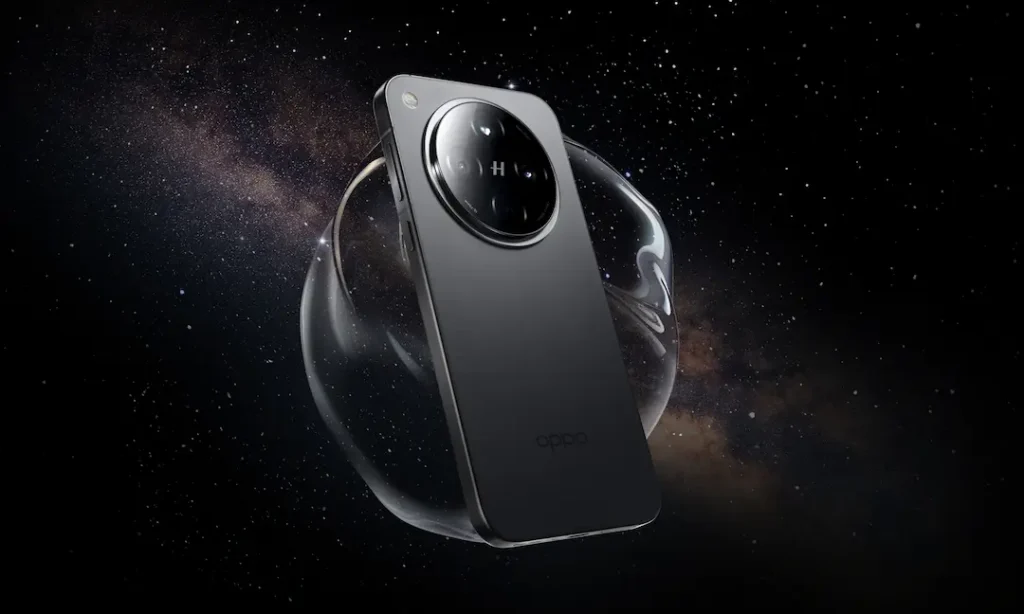
Smartphone photography has evolved dramatically, yet many manufacturers struggle with software processing. The OPPO Find X8 Ultra GCam Port solves this by bringing Google’s legendary computational photography to your device. This port transforms your already capable hardware into a true imaging powerhouse, offering significant improvements in dynamic range, color accuracy, and low-light performance.
Why Choose GCam for Your OPPO Find X8 Ultra?
Google Camera (GCam) leverages advanced AI algorithms that outperform most stock camera apps. Here’s why it’s essential for your Find X8 Ultra:
- Revolutionary Night Sight: Capture 2.3× brighter low-light photos with minimal noise compared to the stock app.
- Enhanced HDR+: Merge multiple exposures for perfectly balanced shots, preserving highlights and shadows in high-contrast scenes.
- Portrait Mode Magic: DSLR-level bokeh with precise edge detection and natural skin tones.
- Astrophotography: Capture the Milky Way using long-exposure techniques unavailable in OPPO’s native app.
- Super Res Zoom: Get clearer zoomed shots using computational photography, compensating for the 6x telephoto’s 95cm minimum focus limit.
GCam vs. Stock Camera: Detailed Comparison
Table: Key differences between OPPO’s stock camera and GCam port
| Feature | Stock Camera | GCam Port |
|---|---|---|
| Low-Light Photos | Good noise control, but soft details | Exceptional clarity with Night Sight |
| Dynamic Range | Often clipped highlights in backlit scenes | Perfectly balanced HDR+ exposure |
| Portrait Mode | Occasional edge detection errors | Professional background blur & skin tones |
| Zoom Quality (6x+) | Digital zoom degrades quickly | Super Res Zoom maintains detail up to 15x |
| Color Science | Saturated colors (especially reds) | Natural, Pixel-like color accuracy |
| Unique Features | True Chroma Sensor for color tuning | Astrophotography, Motion Photos, Google Lens |
*Based on testing data from and GCam feature documentation*
Step 1: Verify Camera2 API Support
The Camera2 API is mandatory for GCam functionality. Here’s how to check/enable it:
- Test Compatibility:
- Install Camera2 API Probe (Play Store).
- Check “Hardware Support Level”: FULL or LEVEL_3 is required .
- If listed as “LEGACY,” enable the API using ADB:
- Enable via ADB (Root Required):
adb shell settings put global persist.camera.HAL3.enabled 1
adb reboot
*Note: Most Find X8 Ultra units ship with Camera2 API enabled, but verify first! *
Step 2: Download the Right GCam Port
After extensive testing across XDA Forums and Reddit, these versions deliver optimal stability:
- BSG GCam 9.6 (Recommended):
*Works perfectly with all four lenses (main, ultra-wide, 3x, 6x) *
- Arnova8G2 GCam 9.4:
*Better for slower-motion video*
Step 3: Install GCam on OPPO Find X8 Ultra
- Enable “Install Unknown Apps” in Settings > Security.
- Open the downloaded APK and tap Install.
- Launch GCam and grant camera/storage permissions.
- Troubleshooting Tips:
- If the app crashes, clear its cache/storage.
- For “viewfinder not working,” try LMC 8.4 (Download).
Step 4: Load an XML Config File (Recommended)
Custom XML configurations optimize GCam for the Find X8 Ultra’s sensors. Community-tested files are available on:
- XDA Developers Thread: Search “Find X8 Ultra GCam Configs”
- Reddit (r/GCamPort): User-shared XMLs for improved HDR+
Installation Steps:
- Download a compatible XML (e.g.,
OPPO_X8U_BSG_v3.xml). - Create folders:
Internal Storage/GCam/Configs9. - Paste the XML file here.
- Double-tap near the shutter button in GCam > Restore.
Experience Photography Like Never Before!
The OPPO Find X8 Ultra GCam Port unlocks capabilities you never knew your phone had. Imagine capturing the stars with Astrophotography mode, taking noise-free concert photos with Night Sight, or achieving perfect portraits every time – all with Google’s industry-leading processing.
💡 Pro Tip: Use the 3x telephoto for macro shots (10cm focus) and GCam’s HDR+ for jewel-like detail.
Ready to transform your Find X8 Ultra? Download GCam now and share your before/after shots with #FindX8UltraGCam! Don’t forget to spread the word – tap below to share this guide!

![MX Player Custom Codec [AC3, DTS, EAC3, MLP, TrueHD, and more]](https://cdn.droidfeats.com/wp-content/uploads/2026/05/mx-player-custom-codec-2026-768x432.webp "MX Player Custom Codec [AC3, DTS, EAC3, MLP, TrueHD, and more]")