Quick answer
Go to Settings > About phone and check your security patch date: you need 2026-11-01 or later to be covered against the SMS of death bug (CVE-2026-58882), and 2026-11-05 or later to get every fix in this month's bulletin.
A bug tracked as CVE-2026-58882, nicknamed the SMS of death, can disrupt calls and messaging on affected Android phones. Google says the fix is included starting at security patch level 2026-11-01, but whether your specific phone has it yet depends on your manufacturer and carrier.
Below you will check your current patch level, confirm it against November’s bulletin, and update if you are behind. The check itself only reads information already on your phone, so there is nothing to back up first.
Before you start
- Difficulty Easy
- Time needed 5 minutes
- Works on Android 14, 15, 16, 16 QPR2, and 17 phones from any manufacturer
What you'll need
- A phone running Android 14 or later
- A Wi-Fi or mobile data connection to install updates
- A few minutes to check a settings screen
Important
- Checking your patch level is read-only and safe, but installing an update will restart your phone and cause brief downtime.
- If you are still on Android 12 or 13, no fix is planned, and you may need to replace the device or rely on a manufacturer-specific patch if one exists.
Quick check: find your security patch level
This tells you whether you already have the fix, and it takes under a minute on any brand.
Step 1: Open Settings and search for security update
Open the Settings app. If you are not sure where the patch level lives on your phone, type security update into the Settings search bar and tap the top result.
Tip: Menu names differ by manufacturer, so search is the fastest route if you get stuck.
Step 2: Read the patch date shown on screen
Look for a date formatted like 2026-11-01. That date is your security patch level, not the same as your Android version number.
Tip: Android version and patch level are two separate fields; check the date, not just the OS number.
Step 3: Compare it against the November bulletin
Patch level 2026-11-01 or later includes the SMS of death fix. Patch level 2026-11-05 or later covers everything in both parts of this month’s bulletin.
Anything dated October 2026 or earlier means you are not yet confirmed protected, unless your manufacturer backported the fix separately.
Tip: An earlier date does not always mean you are vulnerable — some OEMs backport fixes, so check your maker's own advisory if you are unsure.
Check on a Pixel
Pixel’s November update (Android 17 QPR2) ships the fix at patch level 2026-11-05 across the current lineup.
Step 1: Open About phone
Go to Settings > About phone > Android version. Your Android security update status appears at the top of this screen.
Step 2: Confirm you're on 2026-11-05
Eligible Pixels, from the 6a through the 11 Pro Fold, the Pixel Tablet, and all four foldables, should show 2026-11-05. Builds roll out in phases, so a delayed notification on your device does not mean it missed the update.
Step 3: Install it if you're behind
If your date is older, go to Settings > System > Software update > Check for update. That screen shows pending downloads, which is a different place than the About phone screen that confirms what is already installed.
Tip: See Google's own writeup of this update for build numbers and device coverage.
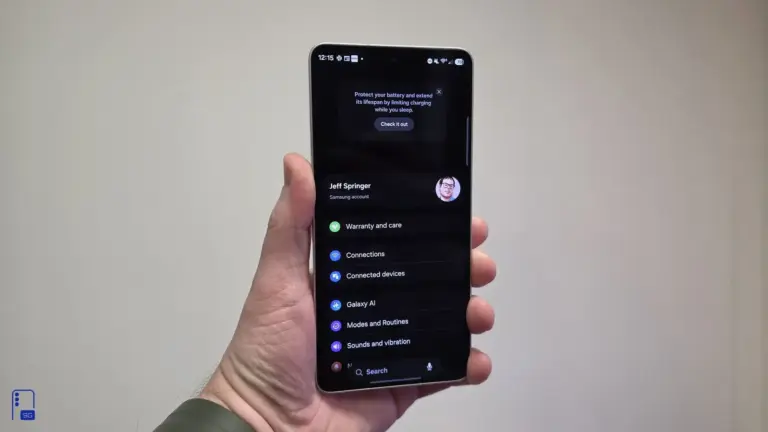
Check on a Samsung Galaxy (One UI)
Samsung labels the same field slightly differently, and the exact path can move between One UI versions.
Step 1: Open About phone
Go to Settings > About phone. You should see One UI Version, Android Version, and a Security Patch Level field with a date.
Step 2: Check Software information if it's missing
On some One UI builds, tap Software information first, then look for Android security patch level underneath. A few builds instead show it under Biometrics and security > Security update.
Tip: If you don't see the exact labels above, your One UI version may word this screen differently; Samsung changes it with almost every release.
Step 3: Update through Software update
If your date is before November 2026, go to Settings > Software update > Download and install.
Tip: Samsung's community forum has an official walkthrough of this check if your menu looks different.
Check on OnePlus or another brand
Brands outside Pixel and Samsung generally keep the patch date under About phone, just with their own label.
Step 1: Open About phone, then Software info
Open Settings, scroll near the bottom to About phone, then tap Software info (OnePlus) or the equivalent option on your brand. The current security patch level appears near the top.
Step 2: Update if the date predates November 2026
If you don’t see a November 2026 date, check your phone’s built-in update app or Settings for a pending system update and install it.
Advanced: verify with ADB
Useful if you manage several devices or want a patch date straight from the system property, bypassing any Settings UI quirks.
Step 1: Enable USB debugging and connect
Turn on USB debugging in Developer options, then connect your phone to a computer with a USB cable.
Step 2: Run the getprop command
From a terminal, run adb shell getprop ro.build.version.security_patch. It returns a date such as 2026-09-05.
On a custom ROM, also check adb shell getprop ro.vendor.build.security_patch, since the vendor partition can lag behind the main OS patch date.
Tip: If the date doesn't change right after an update, restart the phone and run the command again before assuming the update failed.
Pro tips
- Recheck your patch level a day or two after installing an update, since some builds need a reboot to report the new date.
- If you're on Android 12 or 13, Google has not announced a fix, so avoid relying on those phones for emergency or on-call calls.
- Bookmark your manufacturer's own security bulletin page if your patch level stays behind Google's monthly date for more than a few weeks.
Still not working?
| Problem | What to do |
|---|---|
| Settings says no update is available, but my patch date looks old | Check the security patch date field specifically, not just whether a system update is offered. A manufacturer can mark a device as fully updated while the patch date still predates November 2026, so compare the date directly against the bulletin. |
| I installed the update, but the patch level still shows the old date | Restart the phone and check again. On a custom ROM, also check the vendor security patch property, since the vendor partition can carry an older date even after the main OS updates. |
| I can't find a security patch field anywhere in Settings | Use the Settings search bar and type "security update" — menu wording and location vary enough by brand and Android version that search is more reliable than browsing menus. |
Frequently asked questions
What is the SMS of death bug?
It’s the nickname for CVE-2026-58882, an Android vulnerability that can disrupt calls and messaging on affected devices. Google’s fix is included starting at security patch level 2026-11-01.
Which patch level do I need?
2026-11-01 or later covers the SMS of death fix specifically. 2026-11-05 or later covers everything listed in both parts of November’s Android security bulletin.
My patch date is from October. Am I definitely vulnerable?
Not necessarily. Manufacturers sometimes backport fixes ahead of the official patch date, so check your phone maker’s own security advisory if your date is earlier than November 2026.
Does this affect iPhones?
No. CVE-2026-58882 is an Android-specific bug and does not affect iOS devices.
What if my phone runs Android 12 or 13?
Google has not announced a fix for those versions. Check whether your manufacturer has issued its own patch, and avoid relying on the phone for urgent calls until you confirm it.
Once you’ve confirmed your patch date, set a reminder to glance at the same screen each month, since staying a release or two behind is how most phones end up exposed to bugs like this one.
Sources and further reading
- AndroidPure — Android November 2026 Patch Flags a Critical Flaw: Check Your Phone – AndroidPure
- SIIT — How To Examine The Security Patch Level Of Your Android Device To Determine Whether Or Not
- Gadget Hacks — Google's November 2026 Pixel update: security patch and fixes explained
- drfone — How to Check Android and One UI Version on Samsung Galaxy