Quick answer
Turn off Battery Health Assistance (Settings > Battery > Battery health) and cap the background process limit in Developer Options; if that's not enough, enroll in the Android Beta program to get the actual fix, which shipped in the Android 17 QPR2 Beta 7.1 release.
If your Pixel has felt sluggish since September’s Android 17 QPR1 update, you are not imagining it. Google’s own Issue Tracker and reader surveys both point to a real bug: multi-second freezes, stuttering animations, and delayed app switching that show up under memory pressure, hitting Pixel 10 owners especially hard.
There is no official stable fix yet, so this guide walks through the stopgap settings that reduce the stutter, then the beta route that actually patches the underlying driver issue, in order from safest to most involved.
Before you start
- Difficulty Moderate
- Time needed 15 minutes
- Works on Pixel 6a and later running Android 17 QPR1 or later
What you'll need
- A Pixel phone on Android 17 QPR1 or newer
- A few minutes to adjust settings
- A Google account and Wi-Fi if you plan to enroll in the beta
- A backup of your data before enrolling in any beta
Important
- Beta builds can introduce their own bugs, so only enroll if the stutter is seriously affecting daily use.
- Opting out of future beta updates without a data wipe only works until you install another beta build.
- Back up your data before enrolling in the Android Beta program, since reverting isn't always clean.
Quick checks before you change any settings
Rule out an app-specific problem and basic flukes before touching Developer Options.
Step 1: Restart your Pixel
Press and hold Power and Volume up, then tap Restart. This clears cached memory and sometimes settles the stutter for a while, even if it doesn’t fix the underlying bug.
Step 2: Boot into Safe Mode to test for a rogue app
Safe Mode starts your Pixel with only Google’s own apps running. If the lag disappears there, a downloaded app is adding to the memory pressure rather than the OS bug alone.
If you confirm this, uninstall or update the suspect app before trying anything below.
Tip: Check recently installed apps first; they're the most likely culprits.
Step 3: Make sure it's not a different bug
Missing notifications or a dead Quick Settings panel is a separate, unrelated QPR1 report. If that’s what you’re seeing instead of stuttering and freezes, the fixes in this guide won’t help.
Disable Battery Health Assistance and cap background compute
This combination is the workaround several Pixel owners report success with, and it needs no beta enrollment.
Step 1: Turn off Battery Health Assistance
Open the Settings app, tap Battery, then Battery health, and toggle off Battery Health Assistance. This feature throttles charging and background behavior in ways that appear to worsen the stutter on affected builds.
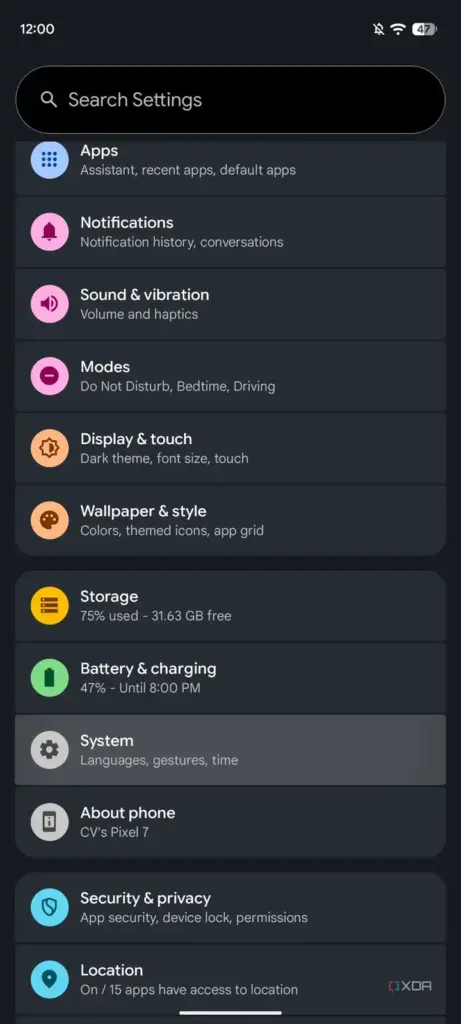
Step 2: Enable Developer Options
Go to Settings > About Phone and tap Build Number seven times. You’ll see a message confirming Developer Options is now unlocked under System.
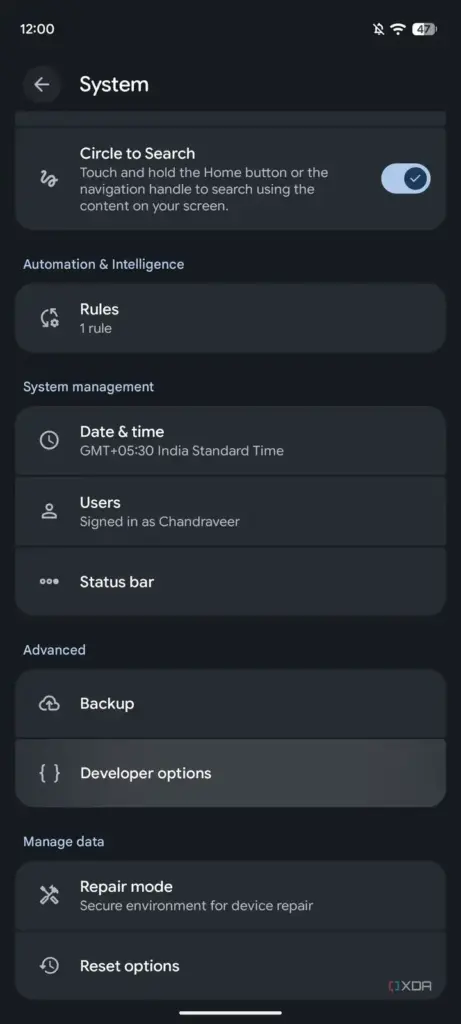
Step 3: Cap the background process limit
Open Developer Options, go to Apps, then find Background Process Limit. Change it from Standard to At most 4 processes.
This stops cached apps from piling up in memory, which is what seems to trigger the freezes during heavy multitasking.
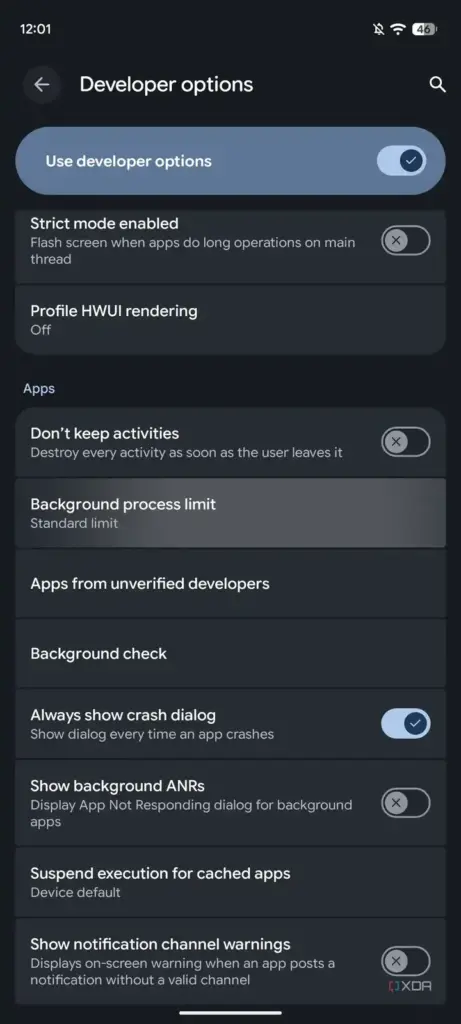
Tip: Lowering the limit can slow re-opening apps slightly; it's a trade-off, not a cure.
Enroll in the Android Beta program for the actual fix
Google has already patched the bug, but only in the Android 17 QPR2 beta channel, not on stable yet.
Step 1: Back up your device
Before enrolling in any beta, back up your photos, messages, and app data. Moving between beta builds rarely requires a full data wipe, but it’s not guaranteed.
Step 2: Enroll your Pixel in the Android Beta program
Visit g.co/androidbeta on your phone and sign in with the Google account tied to your device. Supported devices for the current beta cycle range from the Pixel 6a through the Pixel 11 Pro Fold; the original Pixel 6 and 6 Pro are not on that list.
Tip: Our coverage of the Android 17 QPR1 Beta rollout has more background on what changed build to build.
Step 3: Install the update
Once enrolled, go to Settings > System > System update and install the available beta. You need Android 17 QPR2 Beta 7.1 specifically; that’s the build where Google lists severe UI stuttering and multi-second freezes as the top fix.
Step 4: Check you're on the right build
As of early November, the fix is documented only in QPR2 Beta 7.1 release notes. The newer QPR3 beta notes, checked November 9, don’t mention this issue, so don’t assume a later beta automatically includes the same patch.
Step 5: Treat the workaround settings as temporary
Once you’re on the patched beta, you can turn Battery Health Assistance back on and reset the background process limit to Standard. Revert both again once a stable release with the fix finally ships.
Pro tips
- Install the October stable security update regardless; it won't fix the lag but keeps your phone protected.
- If you're on a Pixel 11, you likely never got QPR1 in the first place and shouldn't need any of this.
- Keep an eye on Google's System update screen for the stable rollout rather than staying on beta indefinitely.
Still not working?
| Problem | What to do |
|---|---|
| The stutter continues even after capping background processes. | Try Safe Mode again to rule out a third-party app, and double-check Battery Health Assistance is actually off, since it can re-enable after some updates. |
| g.co/androidbeta doesn't show your device as eligible. | Confirm your Pixel model is on the supported list for the current beta cycle; the original Pixel 6 and 6 Pro have limited or no access to QPR2 Beta 7.1. |
| You installed the beta but still don't see the fix. | Check that you're specifically on QPR2 Beta 7.1 and not an earlier or later beta build, since only that release lists the stuttering fix. |
Frequently asked questions
Is there a stable fix for Pixel lag after Android 17 QPR1 yet?
No. As of early November, Google hadn’t shipped the fix to the stable channel, and no release date has been confirmed.
Will the Android Beta program wipe my Pixel?
Usually not. Moving onto or between beta builds typically doesn’t require a full reset, but back up your data first since it’s not guaranteed every time.
Are all Pixel models affected by the QPR1 lag bug?
No. Pixel 10 owners report the worst symptoms, the Pixel 11 series appears to have skipped QPR1 entirely, and roughly 20% of Pixel owners in a recent poll reported new performance issues after the update.
Does disabling Battery Health Assistance hurt my battery lifespan?
The feature is designed to slow long-term battery wear, so turning it off removes that protection while you’re using it as a workaround. It’s meant to be temporary until a real fix arrives.
Until Google ships a stable patch, the Battery Health Assistance and background process tweaks are the safest fix, and the QPR2 Beta 7.1 route is there if the stutter is bad enough to justify running a beta. Keep checking Settings > System > System update for the stable release, and revert any workaround settings once it lands.
Sources and further reading
- AndroidPure — Pixel Lagging Since Android 17 QPR1? Google’s Fix Is Still Beta-Only – AndroidPure
- XDA — This one Pixel setting fix stops the Android 17 animation stutter, and it takes 30 seconds
- Insider Paper — Pixel 10a and 9 Users Report Lag After New Android Update
- Android Developers